
Greetings friends and current Remote Desktop Commander customers! We’ve just released Version 7 of our Remote Desktop Commander solution. This major release version introduces many new features- such as a brand new DEX (Digital Employee eXperience) dashboard, automated agent service deployments with WinRM, automatic enhanced user activity monitoring (screenshots and window caption recording without login scripts), new improved database management features, and much more.
Remote Desktop Commander v6.5 Now Available!
Greetings friends and current Remote Desktop Commander customers! We’ve just released Version 6.5 of our Remote Desktop Commander solution. This mid-cycle release version introduces new features such as a consolidated RDS Event Viewer and automatic adjustment of monitored session hosts via broker consultation.
Remote Desktop Commander v6.0+ Highlights
The Version 6.0 release of our Remote Desktop Commander solution offered something for everyone – whether using our free Remote Desktop Commander Lite Client or licensed for our full Remote Desktop Commander Suite.
For instance, here are just some of the notable capabilities:
- The Remote Desktop Commander Suite is packed with expanded capabilities – including an extremely powerful Top Level Deployment Status Dashboard that shows you the health of your Remote Desktop Gateways, Remote Desktop Connection Brokers, and Session Hosts all in an interactive window. This dashboard also integrates with our Remote Desktop Canary product to show current RDS login times in your RDS deployment and alert you to any RDP login issues.
- The Remote Desktop Commander Client has been optimized for additional speed and efficiency when it loads collections full of session hosts.
Remote Desktop Commander v5.0 Highlights
Version 5.0+ of the Remote Desktop Commander and Premium Management Features solutions offers something for everyone – whether you use our free Remote Desktop Commander Lite Client, or you have a license for our commercial products. For instance:
- The Remote Desktop Commander Suite now includes a brand new dashboard and report to track CPU usage by application, plus a new Agent Tuning Wizard and Agent Polling Diagnostics report.
- Our Premium Management Features overlay now offers the Client Side Connection Analyzer, which makes it very easy to troubleshoot RDP disconnects and other connection problems that your users experience on their Windows PCs.
- The Remote Desktop Commander Client now displays, sorts, and groups by user session connection time. [Read more…]
Remote Desktop Commander 3.9 Now Available
Greetings friends and current Remote Desktop Commander customers! We’ve just released Version 3.9 of Remote Desktop Commander, both the Lite and Suite editions, so we want to tell you what’s new under the hood in terms of features.
In this RDPSoft E-Newsletter:
New Remote Desktop Commander 3.9 Features
End of Year Discount for New Subscriptions!
Need RDS Consulting? Contact Our Friends at RDSGurus.com
RDC 3.9 Download and Upgrade Links
MSP? Have a Complex Network? Remote Desktop Commander Now Lets you Monitor and Manage Remote Desktop Session Hosts and Citrix XenApp Deployments in Untrusted Domains and Workgroups
This Feature Is Present In the Following Editions: Suite

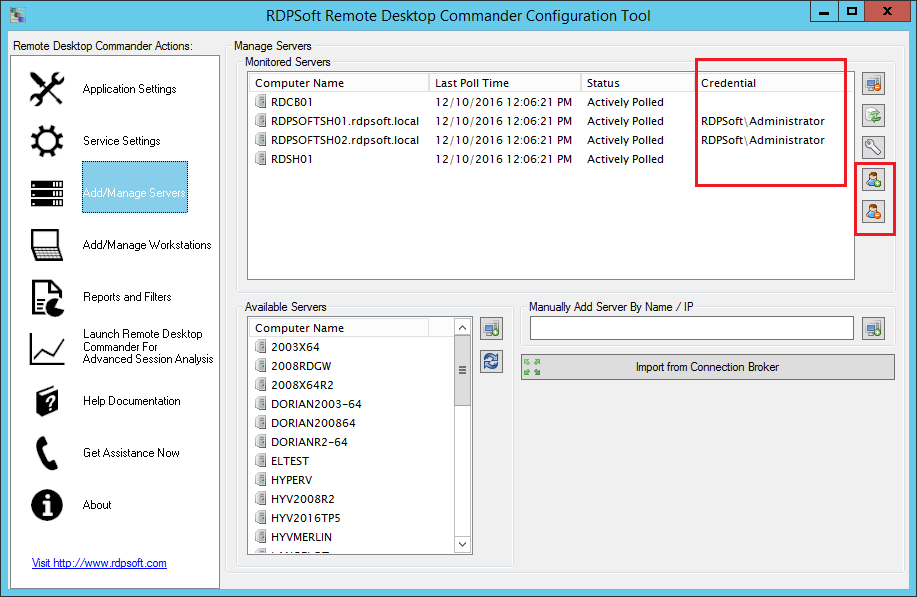

Managed Service Providers know all too well the difficulty of managing systems in multi-tenant environments. Most MSPs isolate each of their clients in a separate domain, and if the client runs Remote Desktop Services or Citrix, the collection/farm is also bound to that domain. Previous versions of Remote Desktop Commander have required a separate deployment per AD forest. Now, in Version 3.9, we’ve made our software friendlier for MSPs. Version 3.9 supports the secure caching of user account credentials that can be used to authenticate against foreign domains.
Remote Desktop Commander administrators, after entering the appropriate credentials, can assign these credentials to RDS session hosts or Citrix servers they need to monitor or actively manage. This allows them to stand up considerably fewer deployments of our Remote Desktop Commander solution, reducing licensing costs associated with Microsoft SQL Server, as well as lowering administrative overhead. Provided that the different client domains are located on the same physical network (or common virtual network/VLAN), and provided there are rules that permit normal Windows network traffic in the datacenter (e.g. Kerberos, Dynamic RPC, etc), our software can authenticate across domains to bring the information from multiple clients into a single database. Similarly, the Farms/Collections of all clients can be managed in one area using the Remote Desktop Commander Client.
Improved Discovery of RDS Collections / Remote Desktop Session Hosts
This Feature Is Present In the Following Editions: Suite

Formerly, the Remote Desktop Commander Configuration Tool required you to add the names of Remote Desktop Session Hosts by hand. Now, if your RDS deployment has a server running the connection broker role, you can enter in the name of the connection broker server, and quickly import your RDSH systems for monitoring.
As described above, Remote Desktop Commander 3.9 allows you to provide alternate credentials for authenticating against foreign, non-trusting domains. You can also use alternate credentials to authenticate against connection brokers in other domains, in order to both monitor and manage those session hosts throughout the programs in the Remote Desktop Commander Suite.
Collect SPLA Usage Data From Untrusting Domains, Plus Filter Reports By Domain In Version 3.9 of the SPL Tracker Module
This Feature Is Present In the Following Editions: Suite

Previously, in order to obtain SPLA usage data for SPLA reporting, we required our MSP customers to stand up an instance of Remote Desktop Commander with the SPL Tracker in each of their client domains. Now, if alternate credentials are defined in the Remote Desktop Commander Configuration Tool, our SPL Tracker tool will also use them automatically to authenticate against foreign domains. And, you can now easily create multiple SPLA license usage classes per domain, by setting up domain filters and using the new Clone feature to duplicate existing license usage classes.
Improved Agent Service Performance and Dashboard
This Feature Is Present In the Following Editions: Suite
In Remote Desktop Commander 3.9, we’ve optimized our Agent service to where it operates faster and can handle a higher volume of monitored objects, such as on Remote Desktop Session Hosts that have tens of thousands of open UDP/TCP connections. We’ve also expanded our Performance Across the Farm Dashboard, so that even if you have not deployed the Agent service to your session hosts, you can still at least see current CPU and memory consumption on each session host.
Retention of Shadowing Preferences
This Feature Is Present In the Following Editions: Suite and Lite (Free)

Several of our customers requested that we add a feature to make Remote Desktop Commander “remember” the shadowing options preferences for the help desk user or administrator. That feature is now present in Version 3.9 and is a great time saver.
Import/Export of Remote Desktop Commander Client Preferences
This Feature Is Present In the Following Editions: Suite and Lite (Free)

Do you have lots of help desk personnel and admins in your organization who need to manage RDS sessions, or access the detailed reporting found in the Remote Desktop Commander Suite? If so, now replicating configuration settings across multiple users is easy. Simply configure one instance of the client as needed, and then export those settings to a dat file. Other users can then import that Preferences file into their instance of Remote Desktop Commander to obtain the same master settings.
Now Through the End of December 2016 – $2 Off Your $9 Per Month Subscription for 3 Months!
Use coupon code RDCDEC16 when you start a new Remote Desktop Commander Suite Monthly Server subscription. Doing so will reduce the monthly per server licensing cost to only $7 per server for the next 3 months. To start your monthly subscription, click here.
Is Your Remote Desktop Services Deployment Giving You Tons Of Challenges? Look No Further Than the Experts at RDSGurus.com

As you know, running a stable and fast Remote Desktop Services deployment takes quite a bit of tweaking. Whether it’s authentication issues, group policy settings, logon times, user profile disks, or application changes, sometimes you need to bring in the big guns. Look no further than the RDS Gurus Consultancy. Led by three Microsoft RDS MVPs, they can get your RDS collection in tip top shape in short order. For the biggest impact, consider leveraging both the RDS Gurus team AND a subscription to our Remote Desktop Commander Suite. Combining the insightful data we collect with the decades of hard won expertise they offer, your RDS infrastructure will soon be running smoother than ever!
Click here to contact the experts at RDSGurus.com
