RDPSoft

Remote Desktop Services and Azure Virtual Desktop Software

We Monitor, Manage & Fix RDS, AVD, Citrix and Parallels RAS
  • Products / Services
    • Not Sure Where To Start?
    • The Complete Monitoring and Management Bundle For End User Computing
    • RDS / AVD Monitoring & Reporting
      • Remote Desktop Commander Suite
      • Sysmundo
    • RDS / AVD Management and RMM Tools
      • Remote Desktop Commander Lite (Free RDS/AVD Management Tool)
      • Remote Assistance RMM Tool + Delegation of Management for RDS/AVD Support Desk
      • Automatic Resolution of Locked Profiles and Stuck Sessions
    • RDS/AVD Synthetic Login Monitoring / Connection Time / Uptime Monitoring Tools
      • Remote Desktop Canary
    • RDS/AVD/Citrix Profile and Session Problem Remediation
      • Fix My Session
    • Digital Forensics and Incident Response Tools
      • Sysmundo
    • Consulting and Professional Services
      • RDS Performance Audits, Security Audits, and General RDS Consulting
      • Custom Report Design Services
      • Training and Other Professional Services
  • Download
    • RDC Lite: Free RDS/Citrix Session and Farm Manager
    • RDC Lite With Premium Management Features
    • RDC Suite: Installer and Release Notes
    • Remote Desktop Canary – Request a Demo/Trial
    • Sysmundo
    • Request Upgrade To New Version
  • Buy
    • The Complete RDS/AVD Monitoring and Management Bundle Purchase Options
      • Start Monthly Subscription Now
      • Start Annual Subscription Now
    • Remote Desktop Commander Suite Purchase Options
      • Start Monthly Subscription Now
      • Start Annual Subscription Now
    • Premium Management Features Purchase Options
      • Start Monthly Subscription Now
      • Start Annual Subscription Now
    • Remote Desktop Canary Purchase Options
      • Start Monthly Subscription Now
      • Start Annual Subscription Now
    • Fix My Session Purchase Options
      • Start Monthly Subscription Now
      • Start Annual Subscription Now
    • Sysmundo Purchase Options
      • Start Monthly Subscription Now
      • Start Annual Subscription Now
    • Buy Incident Based Support Packages
    • Pricing
  • Blog
  • Support
    • Contact Support / Submit Ticket
    • RDPSoft Knowledge Base
  • Contact
  • Partners

Love Pouring In For Remote Desktop Commander!

March 9, 2017 By admin Leave a Comment

Greetings, loyal friends and RDPSoft customers. Today, we wanted to thank you all for the warm feedback we’ve been receiving lately from users of our free Remote Desktop Commander Lite Citrix/RDS Session Manager, as well as the full Remote Desktop Commander Suite. We’re hard at work on Version 4 of Remote Desktop Commander, which will be released in Q2 of 2017, which we’ll let you know about more shortly.

In the meantime, we wanted to share some of the great customer feedback we’re getting – your input and kudos continues to motivate us to make the best and affordable monitoring and management tools for Microsoft Remote Desktop Services and Citrix XenApp/XenDesktop. Enjoy!

Just wanted to drop you a note and thank you again for everything. The full version of this software is really, really good. So many metrics that we didn’t have before, and the console is much better to monitor sessions from than Citrix Studio (or Director) in my opinion.

Love this software. Brilliant!!! Exposure is all that is needed. Great Stuff, life savior in the world of offshore software development.

Great news!!! RDPSoft is operating well with an excess of 110 users on all servers.

Great software and stats, was a huge help.

If you’d like to see what the buzz is about firsthand, feel free to download and use our completely free Remote Desktop Commander Lite tool for all of your RDS/Citrix active session management needs. Or, start a monthly subscription of the Remote Desktop Commander Suite software for only $9 per server per month, and start gaining insight to your entire farm with dashboards and over 80 pre-built reports.

Filed Under: Remote Desktop Services Tagged With: Citrix, RDS, XenApp, XenDesktop Monitoring

Remote Desktop Commander 3.9 Now Available

December 14, 2016 By admin Leave a Comment

Greetings friends and current Remote Desktop Commander customers! We’ve just released Version 3.9 of Remote Desktop Commander, both the Lite and Suite editions, so we want to tell you what’s new under the hood in terms of features.

In this RDPSoft E-Newsletter:


New Remote Desktop Commander 3.9 Features

End of Year Discount for New Subscriptions!

Need RDS Consulting? Contact Our Friends at RDSGurus.com

RDC 3.9 Download and Upgrade Links


MSP? Have a Complex Network? Remote Desktop Commander Now Lets you Monitor and Manage Remote Desktop Session Hosts and Citrix XenApp Deployments in Untrusted Domains and Workgroups

This Feature Is Present In the Following Editions: Suite

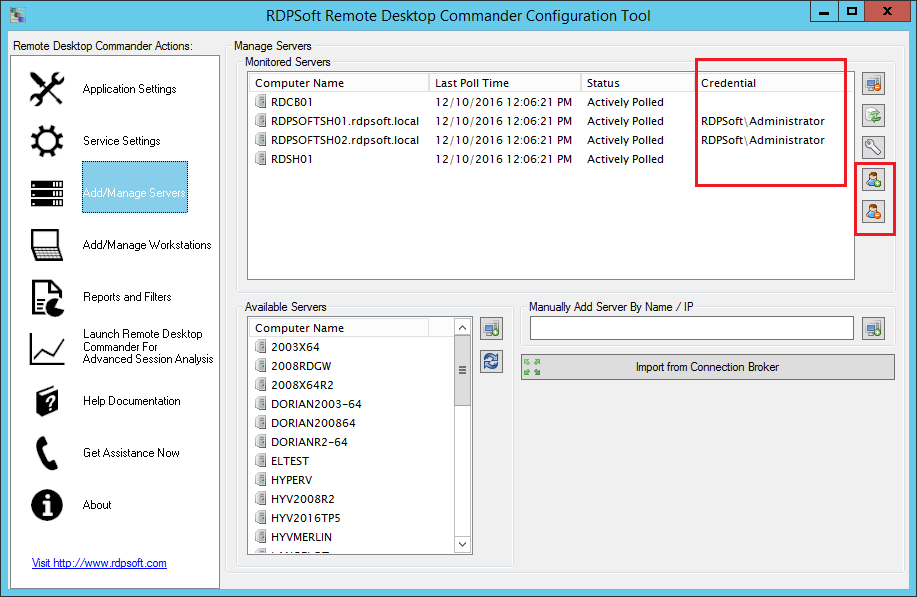
Remote Desktop Commander encrypts and stores alternate credentials in order to monitor Remote Desktop Session Hosts in untrusted domains.
Assign alternate credentials to monitor Remote Desktop Session Hosts in untrusting domains.
Need to manage sessions on RDSH systems in a different domain or workgroup? Simple enter in alternate credentials and away you go!

Managed Service Providers know all too well the difficulty of managing systems in multi-tenant environments. Most MSPs isolate each of their clients in a separate domain, and if the client runs Remote Desktop Services or Citrix, the collection/farm is also bound to that domain. Previous versions of Remote Desktop Commander have required a separate deployment per AD forest. Now, in Version 3.9, we’ve made our software friendlier for MSPs. Version 3.9 supports the secure caching of user account credentials that can be used to authenticate against foreign domains.

Remote Desktop Commander administrators, after entering the appropriate credentials, can assign these credentials to RDS session hosts or Citrix servers they need to monitor or actively manage. This allows them to stand up considerably fewer deployments of our Remote Desktop Commander solution, reducing licensing costs associated with Microsoft SQL Server, as well as lowering administrative overhead. Provided that the different client domains are located on the same physical network (or common virtual network/VLAN), and provided there are rules that permit normal Windows network traffic in the datacenter (e.g. Kerberos, Dynamic RPC, etc), our software can authenticate across domains to bring the information from multiple clients into a single database. Similarly, the Farms/Collections of all clients can be managed in one area using the Remote Desktop Commander Client.

Improved Discovery of RDS Collections / Remote Desktop Session Hosts

This Feature Is Present In the Following Editions: Suite

Remote Desktop Commander 3.9 has improved Connection Broker support.

Formerly, the Remote Desktop Commander Configuration Tool required you to add the names of Remote Desktop Session Hosts by hand. Now, if your RDS deployment has a server running the connection broker role, you can enter in the name of the connection broker server, and quickly import your RDSH systems for monitoring.

As described above, Remote Desktop Commander 3.9 allows you to provide alternate credentials for authenticating against foreign, non-trusting domains. You can also use alternate credentials to authenticate against connection brokers in other domains, in order to both monitor and manage those session hosts throughout the programs in the Remote Desktop Commander Suite.

Collect SPLA Usage Data From Untrusting Domains, Plus Filter Reports By Domain In Version 3.9 of the SPL Tracker Module

This Feature Is Present In the Following Editions: Suite

Now MSPs can authenticate against non-trusting domains, as well as filter SPLA usage data by domain, to rapidly produce consolidated SPLA reports.

Previously, in order to obtain SPLA usage data for SPLA reporting, we required our MSP customers to stand up an instance of Remote Desktop Commander with the SPL Tracker in each of their client domains. Now, if alternate credentials are defined in the Remote Desktop Commander Configuration Tool, our SPL Tracker tool will also use them automatically to authenticate against foreign domains. And, you can now easily create multiple SPLA license usage classes per domain, by setting up domain filters and using the new Clone feature to duplicate existing license usage classes.

Improved Agent Service Performance and Dashboard

This Feature Is Present In the Following Editions: Suite

In Remote Desktop Commander 3.9, we’ve optimized our Agent service to where it operates faster and can handle a higher volume of monitored objects, such as on Remote Desktop Session Hosts that have tens of thousands of open UDP/TCP connections. We’ve also expanded our Performance Across the Farm Dashboard, so that even if you have not deployed the Agent service to your session hosts, you can still at least see current CPU and memory consumption on each session host.

Retention of Shadowing Preferences

This Feature Is Present In the Following Editions: Suite and Lite (Free)

Remote Desktop Commander 3.9 now automatically remembers your shadowing preferences

Several of our customers requested that we add a feature to make Remote Desktop Commander “remember” the shadowing options preferences for the help desk user or administrator. That feature is now present in Version 3.9 and is a great time saver.

Import/Export of Remote Desktop Commander Client Preferences

This Feature Is Present In the Following Editions: Suite and Lite (Free)

Have lots of help desk personnel and administrators who need to manage sessions with Remote Desktop Commander? Use the import/export feature to quickly replicate settings across all users.

Do you have lots of help desk personnel and admins in your organization who need to manage RDS sessions, or access the detailed reporting found in the Remote Desktop Commander Suite? If so, now replicating configuration settings across multiple users is easy. Simply configure one instance of the client as needed, and then export those settings to a dat file. Other users can then import that Preferences file into their instance of Remote Desktop Commander to obtain the same master settings.

Now Through the End of December 2016 – $2 Off Your $9 Per Month Subscription for 3 Months!

Use coupon code RDCDEC16 when you start a new Remote Desktop Commander Suite Monthly Server subscription. Doing so will reduce the monthly per server licensing cost to only $7 per server for the next 3 months. To start your monthly subscription, click here.

Is Your Remote Desktop Services Deployment Giving You Tons Of Challenges? Look No Further Than the Experts at RDSGurus.com

RDS Gurus Consultancy

As you know, running a stable and fast Remote Desktop Services deployment takes quite a bit of tweaking. Whether it’s authentication issues, group policy settings, logon times, user profile disks, or application changes, sometimes you need to bring in the big guns. Look no further than the RDS Gurus Consultancy. Led by three Microsoft RDS MVPs, they can get your RDS collection in tip top shape in short order. For the biggest impact, consider leveraging both the RDS Gurus team AND a subscription to our Remote Desktop Commander Suite. Combining the insightful data we collect with the decades of hard won expertise they offer, your RDS infrastructure will soon be running smoother than ever!

Click here to contact the experts at RDSGurus.com

Remote Desktop Commander 3.9 Download and Upgrade Links

If you are an existing Remote Desktop Commander SUITE subscription licensee and/or active maintenance agreement holder, click here to request upgrade instructions.

If you are an existing Remote Desktop Commander LITE user, click here to download the latest version, which you can install directly over previous Remote Desktop Commander Lite versions.

If you’d like to learn more about the Remote Desktop Commander Suite, including its feature set and how to start a subscription for only $9 per server per month, click here.

Filed Under: Remote Desktop Services Tagged With: Citrix, MSP, RDS monitoring, software releases, XenApp

Most RDS/Citrix Monitoring Tools Licensing Models are Bull$h!+

April 20, 2016 By Andy Milford Leave a Comment

Ready for another epic Andy rant on the Citrix/RDS monitoring industry? Strap into your seats, folks! Today we’re going to take on how most RDS and Citrix monitoring tool vendors adopt licensing models designed to soak their customers and bleed them dry.

RDS Licensing

RDS Licensing Gotcha 1: When They Charge You For Data Retention, and/or Tier Their Licensing Based on Citrix/RDS Data Retention

This seriously chaps my hide. Back when I ran Dorian Software, our licensing model was simple. You paid us for each Windows system you monitored / archived Windows event log data from. We didn’t care if you had your auditing turned on full bore or at a trickle, nor how many gigabytes of log data you generated each day. We simply gathered up the incoming entries and stashed them into a database. Then, we put YOU in control of your own data retention / grooming policies. Provided you had the database server beefy enough to handle a year or more’s worth of log data, you could hold on to data that long or longer.

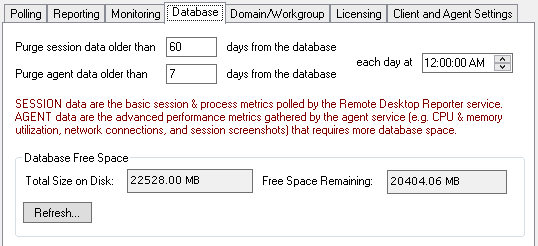
We use this same licensing model at RDPSoft for our Remote Desktop Commander Suite. We put you in charge of the Citrix and RDS data retention, as you can see below from one of our configuration dialogs. And just like in the Dorian days, our licensing model is based on the total number of RDS servers and workstations/virtual desktops you’re collecting data from, not the number of concurrent users connecting to sessions/remote apps, nor the retention days or the volume of data collected. There’s a word for this licensing model: Fair.

rds licensing retention
We put you in complete control of your RDS and Citrix data retention.

However, more and more Citrix and RDS monitoring vendors tie their licensing models to data retention. This includes the Citrix Director plus Edgesight monitoring platform. If you want, in effect, unlimited data retention, you get to pay through the nose. We’ve seen licensing schemes whereby pricing is tiered based on retention, such as one day, one month, or one year. Guess what – the one month and one year data retention options are considerably more costly.

To those vendors adopting those models, we at RDPSoft say: STOP HOLDING YOUR CUSTOMERS’ DATA HOSTAGE.

RDS Licensing Gotcha 2: When They Charge You For Concurrent Users, But Also Count The Built-In Services and Console Sessions Towards the Total

Seriously? You’re so greedy that you’re going to run up the concurrent user count by adding the built-in services and console sessions on every Windows system? Yes, there are vendors in the marketplace that do this. If you’re evaluating other Citrix / RDS monitoring tools, you MUST read their licensing fine print. In this market, more than many others, the licensing scams models are apples and oranges.

Unfair Licensing Schemes Are the Product Of Desperation, Not Innovation

I’ve been around the software industry long enough to tell you how these convoluted and unfair licensing models come into being. It’s no different in the RDS/Citrix tools market.

Picture a bunch of sales weasels professionals gathered around a conference table. They’re sweating bullets because they have major quotas to meet for the year. More than likely there are now ambitious revenue targets set by management in place. “Eureka,” one of them exclaims, “let’s change our licensing model / rules to create more billable units/devices/interfaces/users per customer. That’s the ticket!”

Rather than innovating and raising prices to match an expanded feature set, they simply change the rules of the game midstream. If the subsequent cost increases are mild enough for most customers, those customers don’t complain too much. The old anecdote about boiling a frog slowly comes to mind.

At RDPSoft, Our Licensing Model For RDS and Citrix Monitoring Is Fair, and Maximizes Value

We’re probably old fashioned, but at RDPSoft, we believe in the golden rule. When we buy software or services, we ourselves want to be treated fairly, and we want to support vendors that provide a lot of value for our money. We treat our customers no differently. To summarize, here’s how we do that:

  • Our licensing is based on the number of servers, workstations, or virtual desktops you want to monitor, not the number of named users or concurrent users.
  • We don’t charge you / upsell you based on how much monitoring and reporting data you want to store over time.
  • We don’t pad our margins by forcing you to pay for extra licenses to monitor the built-in console or services sessions.
  • We offer an extremely affordable, pay as you go monthly subscription option for only $9 per RDS/Citrix server monitored, and $1 per Workstation/VDI monitored.
  • We offer free support and a money-back guarantee during the first 30 days after purchase / subscription start. If our software does not perform in your environment for any reason, we will refund your purchase price. Your satisfaction is our number one concern.

Are you ready to save money by dumping your existing RDS/Citrix monitoring vendor? Would you like to start monitoring your RDS farm without breaking the bank on licensing costs? View all the features of our Remote Desktop Commander Suite here, and start your monthly subscription for only $9 per server per month.

Filed Under: RDS Licensing Tagged With: Citrix, RDS monitoring

BriForum Recap: Storm Clouds Over Citrix, Microsoft Rising

August 10, 2015 By Andy Milford Leave a Comment

It’s been a little over two weeks since BriForum 2015 ended out in Denver, and as usual, it was a blast, filled with knowledgeable speakers and engaged attendees covering the entire gamut of virtualization and server-based computing.  This year, I had the privilege of being a BriForum speaker, focusing my talk on the hidden benefits provided by Version 8 of the Remote Desktop Protocol available in Windows 7, Windows 8, Windows Server 2012 and later operating systems.

One of the larger trends I’m seeing, which was echoed by many speakers at BriForum – at least in the server-based computing segment – is how Citrix’s star is fading as a viable solution for mid-market companies.  It’s gotten so bad that key shareholders in Citrix (e.g. Elliot) have effectively forced Citrix to start the spin off of some of its assets and have forced out Mark Templeton as CEO.  There’s a lot to this story, and Gabe Knuth has summed it up much more comprehensively than I can, so read his post for all of the gory details.

What is getting less press, but in my mind is just as or more important, is the fact that Citrix has made critical internal personnel decisions over the past few years leading to offshoring of certain departments with rather poor results.  I noticed the fruit of these decisions years ago when I merely attempted to get XenDesktop/XenApp 6.5 up and running in a lab environment.  A quality software product should not require multiple patches to fix critical issues just to get a solution installed.  And I’m sure CIOs continue to question a.) the high costs of the software itself combined with b.) the high costs of bringing in consultants or other hired guns just to keep their stuff running.  For a smaller or mid-market company without an unlimited budget, this creates a huge incentive to divest themselves of Citrix, and look towards other solutions like VMWare’s Horizon product and “Citrix-lite” alternatives that run on top of RDS.

Which leads me to Microsoft.  Fueled by their expansion of Azure as a comprehensive cloud computing platform, they have been investing *significantly* in remote desktop technologies, especially the latest Remote Desktop Protocol versions.  Their most recent version of the Remote Desktop Protocol, RDP 8, features incredible improvements over previous versions, primarily in the adaptive graphics department AND in the use of UDP as a transport protocol to vastly increase data throughput and responsiveness over less than reliable links (4G, WiFi, Satellite, etc).  While not as bleeding edge as Citrix’s emerging Framehawk technologies in extremely high loss networks, it’s simply *good enough* for the vast majority of corporate networks and teleworking scenarios.  And as we’ve seen in the past, once Microsoft gets *good enough* in a certain market / technology area, they tend to dominate.  Remember Novell, anyone? 🙂

As for us, we’re charting our path alongside Microsoft.  While our software continues to support Citrix and other configurations running on top of RDS, woe be to vendors who are “Citrix only” in their design focus, as I think they’re going to be competing for an ever shrinking piece of the pie.  There will be a lot of money to be made over the coming years on migrating people AWAY from Citrix on to pure Remote Desktop Services, and we will be a proud part of that vendor ecosystem.

Filed Under: Uncategorized Tagged With: Citrix, Microsoft, performance, RDP 8, Remote Desktop Protocol, remote desktop reporting, Remote Desktop Services, SMBs, software releases, Terminal Server monitoring, XenApp monitoring, XenApp Reporting

Automating Microsoft SPLA Reporting With SPL Tracker – Part 1

May 29, 2014 By admin Leave a Comment

Automate SPLA ReportingSPLA reporting is an expanding and increasingly complicated need as cloud and subscription-based solutions become more prevalent in Microsoft Windows environments.

And Really, It Isn’t Just About SPLA Reporting

In addition to Microsoft’s Service Provider License Agreement (SPLA), there is the Citrix Service Provider licensing program as well. Those aren’t the only two examples where subscription-based license reporting is necessary – more and more software vendors that cater to the Managed Service Provider (MSP) community are also offering this form of licensing.

As a result, one of the monthly chores that can considerably complicate the life of an MSP is recurring, subscription-based license reporting.

While monthly subcription based licensing greatly reduces startup costs and large, capitalized expenses, the reporting requirements can be challenging. Every month, the MSP must provide a report to various licensing authorities based on the number of users who used, or more frequently, had the ability to use specific classes of software.

This gets very tedious and labor intensive for MSPs. Some will attempt to script a solution, others will do simple counts based on AD membership or equivalent. However, both of these approaches are problematic, and they do not reflect total costs or utilization rates over time.

SPL Tracker for SPLA Reporting and More . . .

Our new Service Provider Licensing Tracker (SPL Tracker) is a powerful and cost-saving solution for this specific challenge. Leveraging the software usage history and RDS/ICA usage history collected by our Remote Desktop Reporter tool, the SPL Tracker can analyze the difference between actual usage and ability to use certain classes of licenses.

Best of all, it only takes a few steps to configure, and once configured, can completely automate your SPLA reporting and similar MSP license reporting requirements.


Two classes of license types are shown in this screenshot from SPL Tracker, an SPLA reporting software.
SPL Tracker targets the increasing need for SPLA reporting. Above, two classes of license types are shown – Microsoft Office Users and Remote Desktop Users.

Step 1: Defining License Types

By default, two of the most common license classes are defined for you automatically in the software – Microsoft Office Users, and Remote Desktop Users.

Microsoft Office Users

This class represents all users who have accessed Office components (e.g. Microsoft Word, Microsoft Excel, etc) in your shared computing environment, based on Remote Desktop Reporter’s usage history.

Remote Desktop Users

Similarly, the Remote Desktop Users class represents all users who established an RDS or Citrix XenApp session in a given time period.

Additional Definitions / Classes

You can create additional definitions to track the usage of other applications – those that access SQL Server, for example. Simply create a new license type definition, select the processes that reflect the usage, and save it for later use.

Keep in mind that you can automatically omit disabled user accounts from reports. And, you can also prevent the SPL Tracker from marking newly on-boarded user accounts in a client’s Active Directory as inactive.

Upcoming Insights on SPLA Reporting and More . . .

In Part 2 of our Service Provider Licensing Tracker series, we will demonstrate how to correlate historical license usage with the Active Directory groups that control access to those license types.

Do you have questions about what you’ve read here? Respond below!

Filed Under: Software Releases Tagged With: Citrix, MSP, SPL Tracker, SPLA reporting

  • 1
  • 2
  • Next Page »
  • Email
  • LinkedIn
  • Twitter
  • YouTube

Not Sure Where To Start?

In just a few moments, you can find the right fit of solutions and even services for your needs.

> Get Going Now.

Help Documents

Remote Desktop Commander
Help and Users Guide
Release Notes (ver 8.x)

Sign Up for Remote Desktop Tips and RDPSoft Updates

Blog Topic Categories

  • Azure RemoteApp
  • Azure Virtual Desktop
  • citrix edgesight
  • Citrix Shadowing
  • Cloud RDP Monitoring
  • Performance
  • RDP Disconnects
  • RDP Logs
  • RDP Security
  • RDS Infrastructure
  • RDS Licensing
  • Remote Desktop Bandwidth
  • Remote Desktop Management
  • Remote Desktop Memory Usage
  • Remote Desktop Monitoring
  • Remote Desktop Protocol
  • Remote Desktop Reporting
  • Remote Desktop Services
  • Remote Desktop Services Free Tools
  • Server 2012 TSAdmin Replacement
  • Shadow User
  • Software Releases
  • SPLA Reporting
  • Synthetic RDP
  • Sysmon
  • Terminal Server Monitoring
  • Uncategorized
  • User Activity Monitoring
  • User Productivity
  • User Profiles
  • Windows 2008 Terminal Server
  • Windows Virtual Desktop
  • XenApp Reporting

Recent Posts

  • AVD Monitoring
  • How to Optimize AVD Digital Employee Experience
  • Remote Desktop User Activity Monitoring
  • Remote Desktop Commander Suite v8 Now Available!
  • Remote Desktop Commander Suite v8 Beta Details, Plus a New Solution to Limit Local Admin Rights in EUC

From the RDPSoft Blog

  • AVD Monitoring
  • How to Optimize AVD Digital Employee Experience
  • Remote Desktop User Activity Monitoring
  • Remote Desktop Commander Suite v8 Now Available!
  • Remote Desktop Commander Suite v8 Beta Details, Plus a New Solution to Limit Local Admin Rights in EUC
  • Email
  • LinkedIn
  • Twitter
  • YouTube

We Do “Single Pane of Glass” Monitoring and Management for RDS

Top Level Deployment Dashboard

One of the biggest criticisms leveled against Microsoft's Remote Desktop Services as an end user computing (EUC) platform is its complete lack of integrated management and monitoring tools. … Learn more about our centralized RDS monitoring and management >

Reach Out

For fastest response, reach out via our sales and support contact forms.

Sales
US: 1-855-738-8457 x1
Outside the US: 1-702-749-4325 x1

Support
for Evaluators and Priority Support Customers
US: 1-855-738-8457 x2
Outside the US: 1-702-749-4325 x2

© Copyright 2013–2026 RDPSoft. All Rights Reserved. RDPSoft is the sole authorized publisher and distributor of the following software titles: Remote Desktop Commander, Premium Management Features, Remote Desktop Canary · Sitemap