RDPSoft

Remote Desktop Services and Azure Virtual Desktop Software

We Monitor, Manage & Fix RDS, AVD, Citrix and Parallels RAS
  • Products / Services
    • Not Sure Where To Start?
    • The Complete Monitoring and Management Bundle For End User Computing
    • RDS / AVD Monitoring & Reporting
      • Remote Desktop Commander Suite
      • Sysmundo
    • RDS / AVD Management and RMM Tools
      • Remote Desktop Commander Lite (Free RDS/AVD Management Tool)
      • Remote Assistance RMM Tool + Delegation of Management for RDS/AVD Support Desk
      • Automatic Resolution of Locked Profiles and Stuck Sessions
    • RDS/AVD Synthetic Login Monitoring / Connection Time / Uptime Monitoring Tools
      • Remote Desktop Canary
    • RDS/AVD/Citrix Profile and Session Problem Remediation
      • Fix My Session
    • Digital Forensics and Incident Response Tools
      • Sysmundo
    • Consulting and Professional Services
      • RDS Performance Audits, Security Audits, and General RDS Consulting
      • Custom Report Design Services
      • Training and Other Professional Services
  • Download
    • RDC Lite: Free RDS/Citrix Session and Farm Manager
    • RDC Lite With Premium Management Features
    • RDC Suite: Installer and Release Notes
    • Remote Desktop Canary – Request a Demo/Trial
    • Sysmundo
    • Request Upgrade To New Version
  • Buy
    • The Complete RDS/AVD Monitoring and Management Bundle Purchase Options
      • Start Monthly Subscription Now
      • Start Annual Subscription Now
    • Remote Desktop Commander Suite Purchase Options
      • Start Monthly Subscription Now
      • Start Annual Subscription Now
    • Premium Management Features Purchase Options
      • Start Monthly Subscription Now
      • Start Annual Subscription Now
    • Remote Desktop Canary Purchase Options
      • Start Monthly Subscription Now
      • Start Annual Subscription Now
    • Fix My Session Purchase Options
      • Start Monthly Subscription Now
      • Start Annual Subscription Now
    • Sysmundo Purchase Options
      • Start Monthly Subscription Now
      • Start Annual Subscription Now
    • Buy Incident Based Support Packages
    • Pricing
  • Blog
  • Support
    • Contact Support / Submit Ticket
    • RDPSoft Knowledge Base
  • Contact
  • Partners

Remote Desktop Commander v5.0 Highlights

February 10, 2021 By admin Leave a Comment

Version 5.0+ of the Remote Desktop Commander and Premium Management Features solutions offers something for everyone – whether you use our free Remote Desktop Commander Lite Client, or you have a license for our commercial products.  For instance:

  • The Remote Desktop Commander Suite now includes a brand new dashboard and report to track CPU usage by application, plus a new Agent Tuning Wizard and Agent Polling Diagnostics report. 
  • Our Premium Management Features overlay now offers the Client Side Connection Analyzer, which makes it very easy to troubleshoot RDP disconnects and other connection problems that your users experience on their Windows PCs.
  • The Remote Desktop Commander Client now displays, sorts, and groups by user session connection time. [Read more…]

Filed Under: Remote Desktop Reporting Tagged With: performance, rdp disconnects, rdp dropped connections, Remote Desktop CPU, remote desktop performance, Remote Desktop Protocol, software releases, terminal server connect time, terminal server logging, Terminal Server monitoring, user session connect time

Version 4 of Remote Desktop Commander Almost Ready!

December 14, 2017 By admin Leave a Comment

Hello friends and existing customers! We’re excited to let you know that the release of Remote Desktop Commander v4 is just about ready, and wanted to give you a sneak peak of all of the new features it contains.

We will be releasing Version 4 shortly after the start of the new year, along with a small price increase – our first price increase in over 18 months. If you’d like to test drive a release candidate of version 4, please complete the form here and mention that you want to try the release candidate of Version 4 in your comments.

New Remote Desktop Commander 4 Features

Now You Can Pinpoint Historic CPU, Memory, and Other Session Load Bottlenecks on Servers Instantly With the “Historical Performance and Load Across the Farm” Dashboard

Previous versions of Remote Desktop Commander allowed you to view recent performance metrics across your servers, as well as pull up snapshots of performance for all user sessions given a specific period of time. However, the new Historical Performance And Load Across The Farm Dashboard allows you to scroll through hour-by-hour graphs of when your RDS session host servers were under peak load, in terms of memory, CPU, or session count. The graph is interactive, so you can click on a point of interest, and you will immediately be transported to another dashboard that shows you all of the sessions active in that time frame, so you can review the user session(s) that contributed most to the server load and determine what they were doing at the time.

Historical Performance And Load Across the Farm
Track CPU, Memory, and Session Counts On Your RDS Servers Over Time
Historical Performance And Load Across the Farm (2)
Pinpoint Times of High Resource Utilization on RDS Session Hosts.

Historical Performance And Load Across the Farm (3)

Review Which Users Caused High Resource Utilization
After Clicking On a Timeframe of High Resource Utilization, Immediately See Which Users Impacted the Session Host(s) Most.

Quickly Filter Dashboards By Date Range and RDS Collection Name / Server Groups

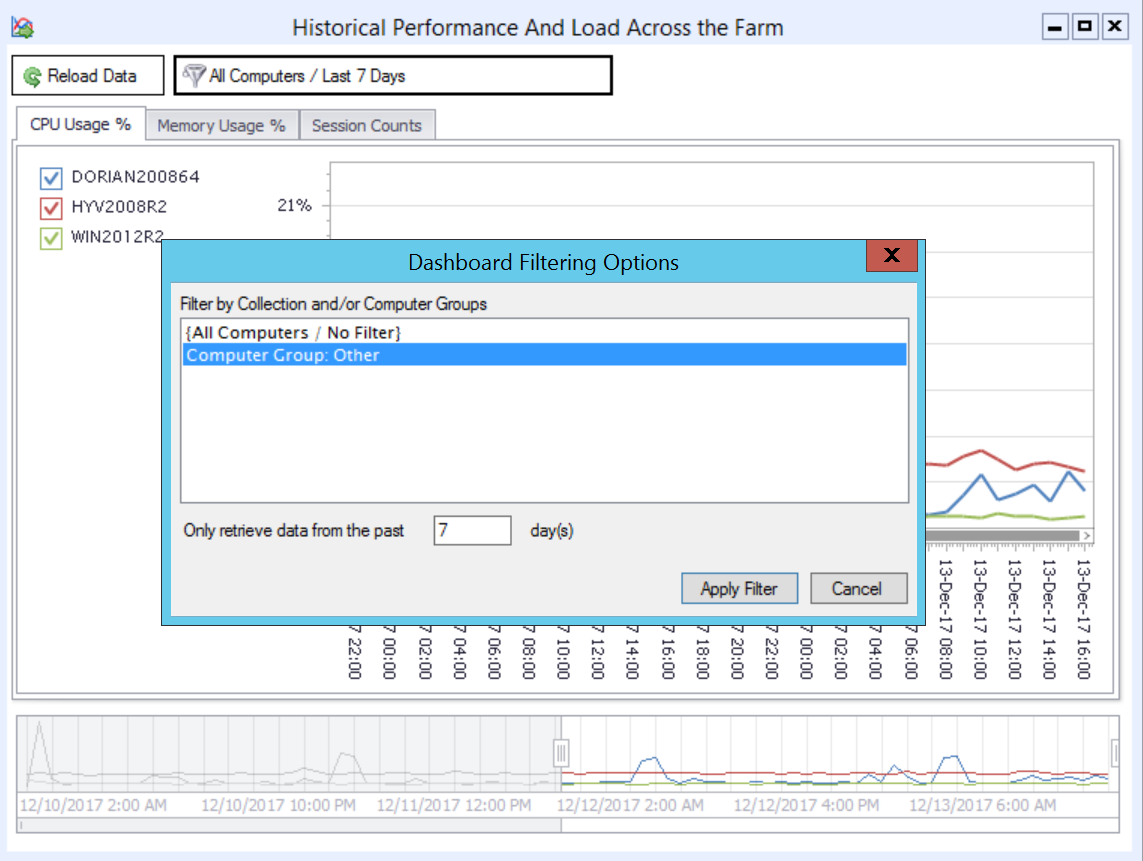
For organizations with larger RDS deployments, attempting to review all of the session host servers in a single dashboard can get complicated. Version 4 of Remote Desktop Commander allows you to quickly filter dashboards by an 1.) RDS collection name, 2.) a user-defined group of RDS servers, and 3.) in some cases, a date range lookback. By doing so, you can keep multiple dashboards up and running inside the Remote Desktop Commander Client, with one dashboard per RDS collection.

Filter Dashboards By RDS Collections
Limit the Scope of Session Hosts Shown in Dashboards By Filtering By Collection Name or Computer Grouping.
Filtered Dashboard By Computer Group
A Dashboard With Fewer Elements Filtered By RDS Collection Name / Computer Group

Azure and Standard SQL Server Authentication Support

Previous versions of Remote Desktop Commander required use of a local SQL Server deployment with Windows Integrated Authentication. Version 4 now also allows you to use a.) an on-premise SQL server with Standard (explicit username/password) Authentication and/or b.) a Microsoft Azure SQL Server deployment. This provides organizations with the flexibility to create multiple SQL databases for multiple RDS deployments on a single SQL Server, even when each deployment is isolated in a different, non-trusting Windows domain.

Now Use Standard SQL Connections and Azure SQL Connections to Store and Review RDS Data

Other Performance Improvements

In addition to the features listed above, we’ve made many other performance improvements and bug fixes in this version. Stay tuned for our official launch announcement shortly!

Filed Under: Software Releases Tagged With: RDS Collection, RDS Performance Monitoring, Remote Desktop CPU, remote desktop management, Remote Desktop Memory, Remote Desktop Services, Terminal Server monitoring

Remote Desktop Performance: Key Metrics to Watch

January 4, 2016 By admin Leave a Comment

So, you’ve implemented a brand new Remote Desktop Services (RDS) or Citrix XenDesktop farm. Now, you want to start monitoring different metrics to get a better handle on Remote Desktop performance in general or maybe determine which users and/or clients are the most costly in terms of resources used.

Here are the key remote desktop performance categories you need to keep an eye on, and why they’re so important:

CPU Usage

While RDS Dynamic Fair Share Scheduling (and the built in Citrix XenApp equivalents) help evenly distribute CPU load amongst “plain vanilla,” “task worker” user sessions, this technology is not a panacea. For some MSPs and on-premise Remote Desktop Services shops, some users will require a much larger share of CPU (implemented via the Windows System Resource Manager) in order to run their beefier software. In other situations, Dynamic Fair Share Scheduling may let you inadvertently stuff too many users on an existing virtual machine, because DFSS will dutily throttle available CPU down to the point where common tasks may take *forever* to complete. Therefore, it is still very important to look at remote desktop CPU consumption patterns by user, even down to the process level running in the user sessions.

Memory Usage

Unlike DFSS above, there is no way to throttle available remote desktop memory per user session, which makes it even more critical to monitor remote desktop memory consumption both by user session aggregate and on a per process basis. By analyzing memory use by user and by process, you can better optimize the farm, and/or silo certain users and/or applications on specific servers that are better provisioned for their memory needs.

Bandwidth Usage

We’ve written at length about Remote Desktop Bandwidth consumption here and here, but many admins continue to be surprised at how much bandwidth RDP or ICA can use, depending on how it has been configured. Remote Desktop Protocol Version 8 and higher can double, triple, or even quadruple bandwidth use in certain use cases when UDP is enabled alongside TCP for transport. Moreover, if you permit transfer of files and screenshots via cut and paste, bandwidth can be consumed in a hurry. Since this has a significant impact on the user experience for others if RDP usage saturates the external Internet link, it’s important to see which users consume the most bandwidth, and what they are doing when they consume it.

Connection Quality

If you’ve moved your RDS farm to Windows Server 2012 or later, you can now get a much greater handle on individual user session latency and “potentially available bandwidth” via new RemoteFX performance counters. This quickly lets you determine if user connection problems are on their end, or if many of your users are experiencing high latency due to a load or networking problem on your end. Unfortunately, these performance counters are not very easy to correlate with individual users, but fortunately, our Remote Desktop Commander Suite can do this automatically for you.

Leverage an Affordable Remote Desktop Performance Monitoring Solution

We’ve touched on four big remote desktop performance monitoring areas above. While Citrix provides some monitoring capabilities in its expensive, upper licensing tiers (via EdgeSight / Director), smaller shops running regular Microsoft Remote Desktop Services are not provided with built in monitoring tools, short of what an admin can script together with PowerShell. While you can look at upper tier monitoring solutions, the per concurrent user price of these tools are rather steep, especially as they are sold through the channel.

For only $9 per server per month, let our Remote Desktop Commander Suite offering monitor each of those areas for you.

Please review our sample reports, demonstration videos, and feature listing now. Then, consider starting your subscription with us. With a 30-day money back guarantee and free initial support, you have absolutely nothing to lose.

Filed Under: Performance Tagged With: remote desktop bandwidth, Remote Desktop CPU, Remote Desktop Memory, remote desktop performance

  • Email
  • LinkedIn
  • Twitter
  • YouTube

Not Sure Where To Start?

In just a few moments, you can find the right fit of solutions and even services for your needs.

> Get Going Now.

Help Documents

Remote Desktop Commander
Help and Users Guide
Release Notes (ver 8.x)

Sign Up for Remote Desktop Tips and RDPSoft Updates

Blog Topic Categories

  • Azure RemoteApp
  • Azure Virtual Desktop
  • citrix edgesight
  • Citrix Shadowing
  • Cloud RDP Monitoring
  • Performance
  • RDP Disconnects
  • RDP Logs
  • RDP Security
  • RDS Infrastructure
  • RDS Licensing
  • Remote Desktop Bandwidth
  • Remote Desktop Management
  • Remote Desktop Memory Usage
  • Remote Desktop Monitoring
  • Remote Desktop Protocol
  • Remote Desktop Reporting
  • Remote Desktop Services
  • Remote Desktop Services Free Tools
  • Server 2012 TSAdmin Replacement
  • Shadow User
  • Software Releases
  • SPLA Reporting
  • Synthetic RDP
  • Sysmon
  • Terminal Server Monitoring
  • Uncategorized
  • User Activity Monitoring
  • User Productivity
  • User Profiles
  • Windows 2008 Terminal Server
  • Windows Virtual Desktop
  • XenApp Reporting

Recent Posts

  • AVD Monitoring
  • How to Optimize AVD Digital Employee Experience
  • Remote Desktop User Activity Monitoring
  • Remote Desktop Commander Suite v8 Now Available!
  • Remote Desktop Commander Suite v8 Beta Details, Plus a New Solution to Limit Local Admin Rights in EUC

From the RDPSoft Blog

  • AVD Monitoring
  • How to Optimize AVD Digital Employee Experience
  • Remote Desktop User Activity Monitoring
  • Remote Desktop Commander Suite v8 Now Available!
  • Remote Desktop Commander Suite v8 Beta Details, Plus a New Solution to Limit Local Admin Rights in EUC
  • Email
  • LinkedIn
  • Twitter
  • YouTube

We Do “Single Pane of Glass” Monitoring and Management for RDS

Top Level Deployment Dashboard

One of the biggest criticisms leveled against Microsoft's Remote Desktop Services as an end user computing (EUC) platform is its complete lack of integrated management and monitoring tools. … Learn more about our centralized RDS monitoring and management >

Reach Out

For fastest response, reach out via our sales and support contact forms.

Sales
US: 1-855-738-8457 x1
Outside the US: 1-702-749-4325 x1

Support
for Evaluators and Priority Support Customers
US: 1-855-738-8457 x2
Outside the US: 1-702-749-4325 x2

© Copyright 2013–2026 RDPSoft. All Rights Reserved. RDPSoft is the sole authorized publisher and distributor of the following software titles: Remote Desktop Commander, Premium Management Features, Remote Desktop Canary · Sitemap