RDPSoft

Remote Desktop and Terminal Server Software

We Monitor, Manage & Fix RDS, AVD, Citrix and Parallels RAS
  • Products / Services
    • Not Sure Where To Start?
    • The Complete Monitoring and Management Bundle For End User Computing
    • RDS / AVD Monitoring & Reporting
      • Remote Desktop Commander Suite
      • Sysmundo
    • RDS / AVD Management and RMM Tools
      • Remote Desktop Commander Lite (Free RDS/AVD Management Tool)
      • Remote Assistance RMM Tool + Delegation of Management for RDS/AVD Support Desk
      • Automatic Resolution of Locked Profiles and Stuck Sessions
    • RDS/AVD Synthetic Login Monitoring / Connection Time / Uptime Monitoring Tools
      • Remote Desktop Canary
    • RDS/AVD/Citrix Profile and Session Problem Remediation
      • Fix My Session
    • Digital Forensics and Incident Response Tools
      • Sysmundo
    • Consulting and Professional Services
      • RDS Performance Audits, Security Audits, and General RDS Consulting
      • Custom Report Design Services
      • Training and Other Professional Services
  • Download
    • RDC Lite: Free RDS/Citrix Session and Farm Manager
    • RDC Lite With Premium Management Features
    • RDC Suite: Installer and Release Notes
    • Remote Desktop Canary – Request a Demo/Trial
    • Sysmundo
    • Request Upgrade To New Version
  • Buy
    • The Complete RDS/AVD Monitoring and Management Bundle Purchase Options
      • Start Monthly Subscription Now
      • Start Annual Subscription Now
    • Remote Desktop Commander Suite Purchase Options
      • Start Monthly Subscription Now
      • Start Annual Subscription Now
      • Buy Perpetual License(s)
    • Premium Management Features Purchase Options
      • Start Monthly Subscription Now
      • Start Annual Subscription Now
    • Remote Desktop Canary Purchase Options
      • Start Monthly Subscription Now
      • Start Annual Subscription Now
    • Fix My Session Purchase Options
      • Start Monthly Subscription Now
      • Start Annual Subscription Now
    • Sysmundo Purchase Options
      • Start Monthly Subscription Now
      • Start Annual Subscription Now
    • Buy Incident Based Support Packages
    • Pricing
  • Blog
  • Support
    • Contact Support / Submit Ticket
    • RDPSoft Knowledge Base
  • Contact
  • Partners

Remote Desktop Canary v2.3 Highlights

September 30, 2020 By admin Leave a Comment

The release of Version 2.3 of Remote Desktop Canary, our synthetic RDP and WVD monitoring and alerting workhorse, offered a whole batch of powerful new features and improvements:

  • WVD support.  Whether you’re still using WVD classic (e.g. Fall 2019 Mode), or you’ve migrated over to WVD in ARM mode (e.g. the Spring 2020 Update), Remote Desktop Canary now supports WVD.
  • An enhanced workflow cloning wizard.  Now, if you want to test each of your session hosts or WVD hosts “all the way to the desktop” using OCR event detection, our new wizard duplicates your test settings across all of your hosts in one easy step.
  • We’ve improved our OCR alerting engine, so if specific text you are screening for is not seen within a certain number of seconds, Canary’s email alert will include all of the screenshots during the login sequence.  As a result, you will immediately see if the login attempt has stalled while loading user profiles/FSLogix, encountered a black screen, or encountered another issue.

[Read more…]

Filed Under: Cloud RDP Monitoring, RDP Login Time, Remote Desktop Performance, Software Releases, Synthetic RDP, Terminal Server Monitoring, Windows Virtual Desktop, WVD Login Time Tagged With: rdp login time, rdp logon time, rds farm health, remote desktop services uptime, terminal server login time, terminal server logon time, windows virtual desktop, WVD, wvd host health, wvd login time, wvd logon time, wvd uptime

Windows Virtual Desktop Officially Announced – My Take

September 24, 2018 By Andy Milford Leave a Comment

This week at Ignite, Microsoft is announcing the introduction of Windows Virtual Desktop, a multi-user version of Windows 10 Enterprise that is deployable in Azure. Please see their blog post here about it.

I will have much more to say about this in future blog posts, but coupled with their heavy investments in “Remote Desktop Modern Infrastructure” (a.k.a RDmi for short) where RDS roles like the Connection Broker, Web Access, and Gateway are now simply PaaS components in Azure, this is going to upend the EUC/virtualization industry in an extreme way. The downward cost pressure Microsoft will place on user desktop and app hosting with this play will be tremendous. In the future at this blog and in webinars we host, we will analyze Windows Virtual Desktop licensing (with RDmi and compute costs factored in) versus traditional on-premise or datacenter-based Remote Desktop Services hosting on Server 2016/2019.

At first glance, I don’t think Windows Virtual Desktop will be good for Citrix, and I certainly think it will threaten Amazon’s DaaS offering. It’s also probably going to put a good swath of non-Azure based MSPs and CSPs out of business. I could be wrong, of course, but that’s my read on it right now.

Fortunately for our customers, we will be Windows Virtual Desktop ready in Q1 2019, and will be able to monitor multi-user Windows 10 instances just like Windows Server RDS session hosts. We look forward to continue to serving the Remote Desktop Services management and monitoring needs of all organizations, whether they run Windows Server or Windows 10 on premise, in the datacenter, or in Azure.

Filed Under: RDS Licensing, Remote Desktop Management, Terminal Server Monitoring Tagged With: azure, Remote Desktop Services, windows virtual desktop

Version 4 of Remote Desktop Commander Almost Ready!

December 14, 2017 By admin Leave a Comment

Hello friends and existing customers! We’re excited to let you know that the release of Remote Desktop Commander v4 is just about ready, and wanted to give you a sneak peak of all of the new features it contains.

We will be releasing Version 4 shortly after the start of the new year, along with a small price increase – our first price increase in over 18 months. If you’d like to test drive a release candidate of version 4, please complete the form here and mention that you want to try the release candidate of Version 4 in your comments.

New Remote Desktop Commander 4 Features

Now You Can Pinpoint Historic CPU, Memory, and Other Session Load Bottlenecks on Servers Instantly With the “Historical Performance and Load Across the Farm” Dashboard

Previous versions of Remote Desktop Commander allowed you to view recent performance metrics across your servers, as well as pull up snapshots of performance for all user sessions given a specific period of time. However, the new Historical Performance And Load Across The Farm Dashboard allows you to scroll through hour-by-hour graphs of when your RDS session host servers were under peak load, in terms of memory, CPU, or session count. The graph is interactive, so you can click on a point of interest, and you will immediately be transported to another dashboard that shows you all of the sessions active in that time frame, so you can review the user session(s) that contributed most to the server load and determine what they were doing at the time.

Historical Performance And Load Across the Farm
Track CPU, Memory, and Session Counts On Your RDS Servers Over Time
Historical Performance And Load Across the Farm (2)
Pinpoint Times of High Resource Utilization on RDS Session Hosts.

Historical Performance And Load Across the Farm (3)

Review Which Users Caused High Resource Utilization
After Clicking On a Timeframe of High Resource Utilization, Immediately See Which Users Impacted the Session Host(s) Most.

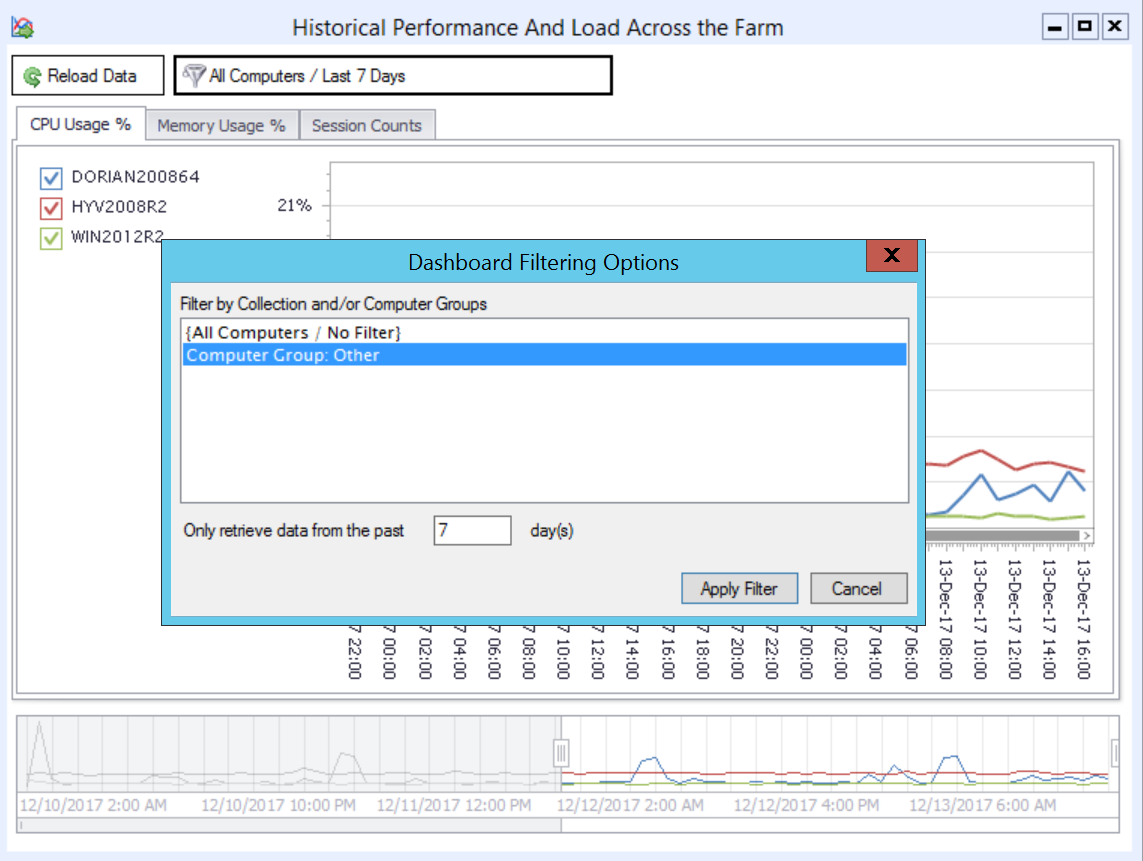
Quickly Filter Dashboards By Date Range and RDS Collection Name / Server Groups

For organizations with larger RDS deployments, attempting to review all of the session host servers in a single dashboard can get complicated. Version 4 of Remote Desktop Commander allows you to quickly filter dashboards by an 1.) RDS collection name, 2.) a user-defined group of RDS servers, and 3.) in some cases, a date range lookback. By doing so, you can keep multiple dashboards up and running inside the Remote Desktop Commander Client, with one dashboard per RDS collection.

Filter Dashboards By RDS Collections
Limit the Scope of Session Hosts Shown in Dashboards By Filtering By Collection Name or Computer Grouping.
Filtered Dashboard By Computer Group
A Dashboard With Fewer Elements Filtered By RDS Collection Name / Computer Group

Azure and Standard SQL Server Authentication Support

Previous versions of Remote Desktop Commander required use of a local SQL Server deployment with Windows Integrated Authentication. Version 4 now also allows you to use a.) an on-premise SQL server with Standard (explicit username/password) Authentication and/or b.) a Microsoft Azure SQL Server deployment. This provides organizations with the flexibility to create multiple SQL databases for multiple RDS deployments on a single SQL Server, even when each deployment is isolated in a different, non-trusting Windows domain.

Now Use Standard SQL Connections and Azure SQL Connections to Store and Review RDS Data

Other Performance Improvements

In addition to the features listed above, we’ve made many other performance improvements and bug fixes in this version. Stay tuned for our official launch announcement shortly!

Filed Under: Remote Desktop CPU, Remote Desktop Management, Remote Desktop Memory, Remote Desktop Memory Usage, Remote Desktop Performance, Remote Desktop Services, Software Releases, Terminal Server Monitoring Tagged With: RDS Collection, RDS Performance Monitoring, Remote Desktop Services

Flexible Licensing for RDS Tools

December 14, 2015 By admin Leave a Comment

Years ago, we launched a flexible month-to-month subscription licensing program for our Remote Desktop Commander Suite, and the result was phenomenal. The traditional channel-driven, expensive perpetual licensing models used by our competition were simply making less and less sense.

While occasionally we offer promotions, you can always count on this: We offer month-to-month licensing that starts at less than $10 per RDS/XenApp server per month, and at about a $1 per virtual desktop/physical workstation.

For more details, check out our pricing for Remote Desktop Commander.

RDS Tools for Specific Tasks . . . And Within Reach

Small and medium-sized businesses who run server-based computing farms designed around Microsoft Remote Desktop Services or Citrix XenApp continue to enthusiastically embrace our licensing model, thrilled to finally have reliable tools that cover areas like:

  • User activity monitoring
  • Remote Desktop connection logging
  • Remote Desktop session management

. . . and the little features that help with things like enabling Remote Desktop remotely and the demystification of RDP logs.

All with so little additional cost.

Not sure where to start? Determine what your needs are for RDS tools or Learn more about Remote Desktop Commander Suite and its many features.

Updated: January 2021.

Filed Under: Cloud RDP Monitoring, Performance, Remote Desktop Memory Usage, Remote Desktop Protocol, Remote Desktop Reporting, Remote Desktop Services, Terminal Server Monitoring, Uncategorized, XenApp Monitoring, XenApp Reporting Tagged With: RDP monitoring, RDS monitoring, Terminal Server monitoring, XenApp monitoring

Why XenApp Monitoring Is So $#%!?@ Expensive

September 21, 2015 By Andy Milford Leave a Comment

This post is likely going to irritate some folks in our industry, and that’s OK. Frankly, that’s the point.

Let’s Pull Back the Curtain On How Server Based Computing (SBC) / End User Computing Software Is Sold

I’ve now been in the SBC industry for nearly 2 years. Prior to that, I was the CEO of Dorian Software, a Windows log management vendor that helped governments and businesses shore up their network security and compliance.

At Dorian, we sold some through the channel, but sold direct to the end user most of the time. Because of this, we we could deliver max value because we didn’t have to pad our pricing to leave tons of margin for channel partners. It was a win-win for everyone involved – we could close deals quicker, and our customers saved a ton of money and realized a quicker return on their investment.

The Citrix and Server Based Computing Markets Are Heavily Channel Driven. Which Means Businesses Of All Sizes Get Soaked By Higher Costs Down the Line.

In my two short years as RDPSoft’s CEO, I’ve been amazed by how insular the server-based computing / end-user computing market is. Big channel players effectively act as gatekeepers of the market, and unless you bring an expensive product to them from which they can extract healthy margins, they’re not going to talk to you.

When I’ve challenged them in conversations on why more customers don’t buy solutions directly from vendors, they speak with open contempt about how “businesses don’t have the skill or expertise to deploy these solutions on their own.” Given how complex, buggy, and temperamental SBC solutions have become, they may well have a point.

However, there are plenty of admins who deploy these products every day with nothing more than online E-Docs and message boards to guide them. I know, because I talk to them each and every week.

As a consequence of the above, most XenApp Monitoring solutions sold through the channel cost more than $600 per server or $50 per concurrent user. When compared to the nearly $300 difference per concurrent user between XenApp Advanced Edition and XenApp Platinum Edition (which ships with all the EdgeSight / Director monitoring goodies), I suppose $50-$100 per concurrent user becomes a relative bargain for larger enterprises. But it’s still out of reach for most SMB shops. And it’s a complete non-starter for Managed Service Providers.

Here’s What You Get To Pay For When You Buy a XenApp/XenDesktop Monitoring Solution From the Channel

Yes, let’s dissect this. It’s not pretty.

  • The portion of the sale paid to the channel partner by the vendor (typically anywhere from 20% to 50%)
  • All those steak dinners and “lunch and learns” the vendor gets to treat the channel partner to once a quarter, in the hope that the channel partner a.) actually knows how to sell their solution, and b.) doesn’t jump ship to a different vendor that’s promising higher margins.
  • All the “under the table” payments made by the vendor to those “independent” server-based computing / end-user computing “experts” you know and love, so said experts will hawk their products in blog articles, online reviews, and at trade shows. Yes, I know said experts have to eat too, but there’s an appalling lack of transparency about how prevalent this practice is in our industry. Could we have a little more voluntary disclosure, please??!!

The Net Result: SMBs Often Get Priced Out Of the XenApp Monitoring Market

Most of the channel fat cats described above (and by extension, the vendors they partner with) have no interest in dealing with Citrix and RDS deployments in organizations with fewer than 100 concurrent users. Many of them also don’t want to deal with shops that have fewer than 500 concurrent users. However, the irony in all of this is that the *vast majority* of Citrix and RDS farms feature fewer than 500 users. Because of this effective orphaning of the SMB market, admins in these smaller networks don’t have a lot of options in their budget range. They may cobble together some scripts, lean too heavily on traditional Network Monitoring Software that doesn’t have much depth when it comes to monitoring/reporting on SBC activity, or sadly, go without. This needs to change.

It’s Time To Disrupt This Industry To Benefit the SMBs and MSPs

Now that we’ve studied this market, and seen it for how it truly is, warts and all, we’re throwing down the gauntlet.

For only $9 per server per month, or $1 per workstation/virtual desktop per month, you can now acquire subscription licensing from us. Yes, you read that correctly.

Want to continually monitor 10 XenApp servers year around? No problem – that will cost you $1080 a year.

Want to do a simple 90 day assessment of remote worker productivity on your 5 RDS servers? Easy enough – just carry a subscription for 3 months, and pay only $135!

Have two RDS servers you need to check bandwidth consumption on for 30 days? We think you’ll find that $18 to be a bargain.

Now It’s Your Turn. Help Us Get the Word Out About Our New Flexible and Affordable Pricing.

Let your colleagues and friends know about our new offering, via social media, forum exchanges, trade shows, and simple word of mouth. As a token of our appreciation, if you send us a link to a post or share you made about our new pricing model and feature set, we’ll give you a 2-month subscription credit on monitoring in your own environment! Help us shake up this niche so that organizations of all sizes will benefit.

Filed Under: RDS License Metering, Remote Desktop Bandwidth, Remote Desktop Management, Remote Desktop Protocol, Remote Desktop Reporting, Remote Desktop Services, Software Releases, Terminal Server Logging, Terminal Server Monitoring, User Productivity, XenApp Monitoring, XenApp Reporting Tagged With: XenApp monitoring, XenApp Reporting, XenDesktop Monitoring, XenDesktop Reporting

  • « Previous Page
  • 1
  • 2
  • 3
  • Next Page »
  • Email
  • Google+
  • LinkedIn
  • Twitter
  • YouTube

Not Sure Where To Start?

In just a few moments, you can find the right fit of solutions and even services for your needs.

> Get Going Now.

Help Documents

Remote Desktop Commander
Help and Users Guide
Release Notes (ver 6.x)

Sign Up for Remote Desktop Tips and RDPSoft Updates

Blog Topic Categories

  • Azure RemoteApp
  • Azure Virtual Desktop
  • citrix edgesight
  • Citrix Edgesight Replacement
  • Citrix Shadowing
  • Cloud RDP Monitoring
  • DEX
  • Performance
  • RDP Disconnects
  • RDP Latency
  • RDP Login Time
  • RDP Login Tracking
  • RDP Logon Failure Tracking
  • RDP Logs
  • RDP Loss Rate
  • RDP Security
  • RDP Transmission Rate
  • RDS Infrastructure
  • RDS License Metering
  • RDS Licensing
  • Remote Desktop Bandwidth
  • Remote Desktop CPU
  • Remote Desktop Management
  • Remote Desktop Memory
  • Remote Desktop Memory Usage
  • Remote Desktop Monitoring
  • Remote Desktop Performance
  • Remote Desktop Protocol
  • Remote Desktop Reporting
  • Remote Desktop Security
  • Remote Desktop Services
  • Remote Desktop Services Free Tools
  • Remote Desktop Services Hotfix
  • Sensitive Data
  • Server 2012 TSAdmin Replacement
  • Shadow User
  • Software Releases
  • SPLA Reporting
  • Synthetic RDP
  • Sysmon
  • Telecommuting/Teleworking
  • Terminal Server Logging
  • Terminal Server Monitoring
  • Uncategorized
  • User Activity Monitoring
  • User Productivity
  • User Profiles
  • Windows 2008 Terminal Server
  • Windows Virtual Desktop
  • WVD Login Time
  • XenApp Monitoring
  • XenApp Reporting

Recent Posts

  • Fix My Session v1 Now Available!
  • How To Perform User Activity Monitoring in Azure Virtual Desktop
  • Remote Desktop Commander v7 Now Available!
  • How To Deploy Sysmon The Easy Way
  • Remote Desktop Canary v4.0 Now Available!

From the RDPSoft Blog

  • Fix My Session v1 Now Available!
  • How To Perform User Activity Monitoring in Azure Virtual Desktop
  • Remote Desktop Commander v7 Now Available!
  • How To Deploy Sysmon The Easy Way
  • Remote Desktop Canary v4.0 Now Available!
  • Email
  • Google+
  • LinkedIn
  • Twitter
  • YouTube

We Do “Single Pane of Glass” Monitoring and Management for RDS

Top Level Deployment Dashboard

One of the biggest criticisms leveled against Microsoft's Remote Desktop Services as an end user computing (EUC) platform is its complete lack of integrated management and monitoring tools. … Learn more about our centralized RDS monitoring and management >

Reach Out

For fastest response, reach out via our sales and support contact forms.

Sales
US: 1-855-738-8457 x1
Outside the US: 1-702-749-4325 x1

Support
for Evaluators and Priority Support Customers
US: 1-855-738-8457 x2
Outside the US: 1-702-749-4325 x2

© Copyright 2013–2026 RDPSoft. All Rights Reserved. RDPSoft is the sole authorized publisher and distributor of the following software titles: Remote Desktop Commander, Premium Management Features, Remote Desktop Canary · Sitemap