RDPSoft

Remote Desktop and Terminal Server Software

We Monitor, Manage & Fix RDS, AVD, Citrix and Parallels RAS
  • Products / Services
    • Not Sure Where To Start?
    • The Complete Monitoring and Management Bundle For End User Computing
    • RDS / AVD Monitoring & Reporting
      • Remote Desktop Commander Suite
      • Sysmundo
    • RDS / AVD Management and RMM Tools
      • Remote Desktop Commander Lite (Free RDS/AVD Management Tool)
      • Remote Assistance RMM Tool + Delegation of Management for RDS/AVD Support Desk
      • Automatic Resolution of Locked Profiles and Stuck Sessions
    • RDS/AVD Synthetic Login Monitoring / Connection Time / Uptime Monitoring Tools
      • Remote Desktop Canary
    • RDS/AVD/Citrix Profile and Session Problem Remediation
      • Fix My Session
    • Digital Forensics and Incident Response Tools
      • Sysmundo
    • Consulting and Professional Services
      • RDS Performance Audits, Security Audits, and General RDS Consulting
      • Custom Report Design Services
      • Training and Other Professional Services
  • Download
    • RDC Lite: Free RDS/Citrix Session and Farm Manager
    • RDC Lite With Premium Management Features
    • RDC Suite: Installer and Release Notes
    • Remote Desktop Canary – Request a Demo/Trial
    • Sysmundo
    • Request Upgrade To New Version
  • Buy
    • The Complete RDS/AVD Monitoring and Management Bundle Purchase Options
      • Start Monthly Subscription Now
      • Start Annual Subscription Now
    • Remote Desktop Commander Suite Purchase Options
      • Start Monthly Subscription Now
      • Start Annual Subscription Now
    • Premium Management Features Purchase Options
      • Start Monthly Subscription Now
      • Start Annual Subscription Now
    • Remote Desktop Canary Purchase Options
      • Start Monthly Subscription Now
      • Start Annual Subscription Now
    • Fix My Session Purchase Options
      • Start Monthly Subscription Now
      • Start Annual Subscription Now
    • Sysmundo Purchase Options
      • Start Monthly Subscription Now
      • Start Annual Subscription Now
    • Buy Incident Based Support Packages
    • Pricing
  • Blog
  • Support
    • Contact Support / Submit Ticket
    • RDPSoft Knowledge Base
  • Contact
  • Partners

Why Synthetic RDP Monitoring and What Is It Really Anyway?

September 18, 2019 By Andy Milford Leave a Comment

When we were first beta testing Remote Desktop Canary™, we realized that the phrase “synthetic RDP monitoring” was fairly fresh for some.

Today, there still can be confusion for some about the phrase.

One of the most challenging aspects of monitoring the health of your Remote Desktop Services environment is measuring how quickly it responds to external and internal logins.

[Read more…]

Filed Under: Synthetic RDP Tagged With: rdp login failure, rdp login time, synthetic rdp, synthetic rdp login, synthetic rdp logon, synthetic rdp monitoring, synthetic rdp testing

Remote Desktop Commander & WVD Management With PowerShell Integration

July 18, 2019 By Andy Milford Leave a Comment

As we’ve shared elsewhere, version 4.7+ of our Remote Desktop Commander Suite supports deployment in Microsoft Windows Virtual Desktop (WVD) tenants.

And much regarding how we handle WVD management has been tuned up since version 4.7 and our subsequent WVD PowerShell integration announcement.

Here, we’ll take an opportunity to drill more specifically into our solution’s integration with WVD and developments along the way in the Remote Desktop Commander Suite.

Product Integration With The WVD PowerShell Management Libraries

As you may already know, the current methods of WVD management are through a set of PowerShell libraries and/or taking the time to deploy Microsoft’s REST API web-based management console. Both approaches have their limitations, and the management features provided in both do not offer feature parity yet with the management features for RDS in the Windows Server Manager.

So, we started wrapping the WVD Powershell management library in our Remote Desktop Commander management GUI. Management actions in our GUI are passed internally to the PowerShell libraries without the admin needing to use PowerShell at all. Moreover, we are offering two modes of management for Windows Virtual Desktop.

Our new beta version dynamically queries the WVD Broker to get tenant host pools and hosts
Our solution dynamically queries the WVD Broker to get tenant host pools and hosts.


Choose the management mode you want to use with WVD, based on whether you have installed our tool inside or outside of your Azure VNet.
Windows Virtual Desktop Management Local Mode

“Local Mode” allows you to install our software INSIDE the same Azure VNet as one or more WVD tenants you manage, and then provides you with full management feature parity we currently offer for traditional RDS deployments. WVD hosts are enumerated from the primary WVD broker service, but then are managed with native APIs from within the local Windows network inside Azure for rich functionality, including shadowing, performance counter access, etc. Admins are encouraged to deploy our management client as a RemoteApp in various tenants OR to use Azure Bastion to access our management tools that have been directly deployed on a VM in the VNet of one or more WVD tenants.

Full management feature parity is available when you deploy Remote Desktop Commander into the Azure VNet where your WVD hostpools are running.
Full management feature parity is available when you deploy Remote Desktop Commander into the same Azure VNet where your WVD host pools are running.
Windows Virtual Desktop Management External Mode

“External Mode” a.k.a “Outside Mode” provides a more limited set of management functionality based on the current version of the WVD Powershell library, such as logging off and disconnecting users, sending notification messages to users, and taking hosts in and out of drain mode. However, in this mode you can run our tool from any system that has Internet access to access the WVD broker service.

A subset of WVD management features are provided, based on wrapped WVD Powershell management libraries, when Remote Desktop Commander is installed outside the Azure WVD VNet.

And there are so many bonuses as well: For example, our software’s ability to automatically install the WVD PowerShell Management libraries for you from the PowerShell Gallery, and the convenient caching of administrative credentials used by those PowerShell libraries.

Perhaps most importantly, our Remote Desktop Commander Management client gives you the power to manage both your traditional on-premises Remote Desktop Services deployments, Remote Desktop Services deployments located in Azure, and new Windows Virtual Desktop deployments all in one interface. It can be instructed to query as many connection brokers or WVD tenants as required for RDS collection and WVD host pool information.

Remote Desktop Commander will automatically prompt you to install the WVD PowerShell Management libraries, and then will do so for you.

Installing WVD PowerShell Management Libraries

Next Steps . . .

Where to next? Find out where to get started and what best fits your needs.

Updated: December 2020.

Filed Under: Windows Virtual Desktop Tagged With: windows virtual desktop management, windows virtual desktop powershell, wvd management

How Not To Lose Your A$$ When Deploying Windows Virtual Desktop

July 10, 2019 By Andy Milford Leave a Comment

Hello my friends.  It’s now July, and Microsoft continues to lurch ever closer to a full, generally available, release of Windows Virtual Desktop in this back half of the year.  Lots of MSPs and hosters are extremely interested in it, with great uptake in the public preview, because ostensibly WVD is a lower cost way to deploy session-based desktops in the public cloud.  But is it really?  In my opinion, Windows Virtual Desktop is only affordable if you are extremely cautious about any extra Azure services you choose to deploy with it.  And, in all cases, stay the hell away from WVD overlays like Citrix Managed Desktop… unless you are an unrepentant spendthrift with money to burn! Let’s dive a little deeper and see why:

Why WVD Is Potentially Cheaper Than Hosting Regular Remote Desktop Services In Azure

In classic RDS deployments inside Azure, you need to allocate additional virtual machine resources to host the supporting Remote Desktop roles (such as the Remote Desktop Gateway server, the Connection Broker, RD Web Access, and Licensing). In some non-highly available deployment scenarios, it’s possible to combine some of these roles onto a single VM but, no matter how you slice it, you will be paying monthly compute costs for these additional VMs.

In Windows Virtual Desktop, Microsoft handles all of the infrastructure roles (Gateway, Broker, Web Access, etc) for you, encapsulating them into highly available Azure PaaS services that serve your tenants alongside all others. This theoretically saves you money, because you are now only paying for the compute costs associated with the session host VMs (e.g. Windows Server or Windows 10 Multisession), plus your RDS CAL or Windows/Office 365 licensing that allows access to the service..

Why WVD Is Not Necessarily Cheaper Than Hosting Classic RDS in Azure

Put simply, what you save by avoiding the compute costs associated with VMs running infrastructure roles, you can easily add back by deploying other “recommended” Azure services.

Hidden Azure Service Costs

For example:

  • Starting an Azure Security Center subscription for Just-In-Time VM Access (approximately $15 per VM per month)
  • Deploying Azure Log Analytics and Azure Monitor to do performance and health monitoring (variable pricing based on data volumes and logs monitored but easily $5 or more per VM per month)
  • Using Azure Active Directory Premium P1 or P2 OR the Enterprise Mobility Suite to provide multi-factor authentication, identity and access management, etc (approximately $3 to $9 per user extra per month)
Extra VMs Needed For Geographically Diverse Clients

There are other factors to consider as well.  As discussed in my purerds.org blog article, Windows Virtual Desktop does not currently support dual transport protocols for RDP – it is TCP only.  This makes distance between WVD clients and the WVD host pool in a specific Azure region highly relevant.  As I’ve written about at length, one of the greatest improvements ever made to the Remote Desktop Protocol was when Microsoft joined UDP with TCP for more responsive transfer of data, video streams, etc over lossy networks or higher latency/longer distance network links.  If WVD did support UDP transport in RDP to clients, Azure region choice would become less relevant because of the ability of UDP to adapt to those higher latencies caused by geographic distance.

What does this mean?  It means a greater likelihood of an MSP or hoster needing to establish multiple WVD host pools, in different Azure data centers, to serve the needs of geographically disparate clients/companies with worldwide offices.  True, the WVD internals may be able to use intelligent routing via Azure Traffic Manager, especially as Microsoft builds out the WVD control plane into all Azure regions but, until UDP dual transport is added back IMO, performance will suffer.  More host pools equal more money spent on VM compute.

Extra VMs Needed for Validation Host Pools

Update cadences are much faster when you leverage the Windows 10 Multisession OS in your WVD host pools, as compared to server operating systems like 2012, 2016, and 2019.  This means that there is a greater likelihood that a Windows Update might break an existing deployed app.  Microsoft’s answer to this problem is to deploy a validation host pool, which is a special set of VMs that get the Windows 10 updates applied to them first.  These effectively become the “canary in the coal mine”, to alert you to application incompatibilities post update- before all of your users call you up to air their grievances.  However, an additional host pool of VMs is an additional cost to you.

Deploy Citrix Managed Desktop For WVD If You Really Want To Hemorrhage Money Fast

Say No To Citrix Managed Desktop
Want to Lose Money? Deploy Citrix Managed Desktop.

As mentioned in my PureRDS.org article on the subject, Citrix Managed Desktop adds another $21 per user per month on top of your Windows Virtual Desktop costs.  That’s an insane level of extra overhead for an MSP, hoster, or SMB company to bear.  Frankly, there’s no need for it- especially if you are smart about what third-party software and services you choose to add to your WVD deployment.  Which leads me to…

Smart Ways To Keep Your WVD Deployment Within Budget

Here are some tips and tricks that you can use to keep WVD costs to the bare minimum, as you host your apps and desktops.

Managing Windows Virtual Desktop On a Budget

The web interface and PowerShell cmdlets for managing WVD are extremely basic and rather feature limited.  On top of that, attempting to monitor WVD by building your own queries with Azure Monitor and Azure Log Analytics gets expensive fast- especially when you factor in staff time to design everything.

Instead, you can publish our Remote Desktop Commander Client as a RemoteApp within one of your WVD host pools, and instantly have a robust management platform for WVD– including shadowing and remote support.  Or, if you don’t want to leverage RemoteApp, you can elect to deploy the new Azure Bastion service– which gives you secure access to all of the WVD VMs in your host pools, and connect to a VM with our Remote Desktop Commander Client installed.  Azure Bastion only costs a flat $68 per month plus data transfer, regardless of how many VMs you need to access from it, and our Remote Desktop Commander Client is free, with optional enhancements via Premium Management Features.  This is certainly much cheaper than paying $15 per VM per month for Just-In-Time access to VMs via raw RDP.

Monitoring Windows Virtual Desktop On a Budget

Of course, if you need to actively monitor your Windows Virtual Desktop deployments, you can leverage our Remote Desktop Commander Suite solution, and pair it with an Azure SQL Database (for data collection and storage).  As opposed to paying hefty data ingestion rates (plus per performance counter and per log monitoring costs via Azure Monitor and Azure Log Analytics), you can rapidly deploy our solution that: a.) already knows what items to monitor out of the box, b.) can monitor performance much more granularly than Azure Monitor, c.) has a built in reporting engine with scheduler, and d.) is priced at a flat $9.99 per WVD VM per month, with volume discounts.  Azure SQL costs for most deployments typically only run $30 to $60 per month, with up to 250 GBs of storage provided.  This is a much more economical way to monitor your infrastructure.  Moreover, if you’re a hoster/MSP/CSP, we offer a special multi-tenant version of our solution that allows you to keep tabs on all of your WVD deployments from a single access point.

Remote Desktop Commander Core Architecture
Remote Desktop Commander Core Deployments Allow You To Centrally Monitor and Report On Multi-Tenant Environments (e.g. MSP Private Clouds and WVD in Azure)

Consider Running Classic RDS in Azure Instead of WVD

Even with the launch of WVD, you can still deploy traditional RDS inside Windows Azure using Server 2012, 2016, or 2019; including the ability to run Office 365 on those server operating systems.  Doing so gives you complete control over the RDS architecture, and allows you to utilize RDP with UDP and TCP to provide a better experience to geographically diverse clients.

Partner With an Azure Expert

The sheer number of Azure services and pricing I covered in this article probably has left you feeling dizzy.  Given the speed at which new Azure services are offered, one of the smartest things you can do is to partner with an Azure services expert like MyCloudIT.
mycloudStacked_color

The folks at MyCloudIT constantly stay on top of the different Azure service offerings, and are experts at provisioning only the services you need.  They work hard to keep you within budget and on top of Azure service costs.  They’re also experts at deploying our Remote Desktop Commander Suite solution into RDS and WVD deployments, which they’ve already done for a number of their “RDS in Azure” clients.  Partnering with them is a much smarter option than going with an WVD overlay like Citrix Managed Desktop- at a fraction of the cost.

If you’ll be attending Microsoft Inpire next week, come visit them at Booth 3106 to see both their approach to hosting Remote Desktop Services in Azure AND how our Remote Desktop Commander Suite enhances their management and monitoring offerings. And please tell them Andy from RDPSoft sent you!

Filed Under: Windows Virtual Desktop Tagged With: azure bastion, azure log analytics, azure monitor, managing wvd, Monitoring WVD, remote desktop, remote desktop commander, windows virtual desktop cost, WVD, wvd cost

User Session Shadowing in Remote Desktop Commander v4.7+

June 12, 2019 By admin Leave a Comment

Until the release of our Remote Desktop Commander v4.7, one of the continuous laments that we used to hear from our customer base for years centered on the user session shadowing in Remote Desktop Services.  This is a shame, because the internal architecture for shadowing from Windows Server 2012 R2 onwards is pretty amazing!  Using MSTSC to shadow proved however less than smooth.  The litany of complaints has always included problems like:

  • lack of proper shadowing support (zoom out) for multiple monitor sessions;
  • dreaded permissions errors;
  • the unfortunate requirement for help desk users to be administrators (!) on the terminal servers they want to shadow;
  • the inability for Windows 7 systems to initiate shadowing on Server 2012/2016/2019 systems and Windows 8 and 10 workstations.

There was also the small issue that there were no tools for shadowing/remote assistance inside Windows Virtual Desktop in Azure.

By the way: Check out this twisted history of shadowing RDP users.

In the resulting confusion, admins and IT staff have been paying an arm and a leg for remote assistance tools to bridge this gap for years. These tools require heavy install footprints, hundreds or even thousands of dollars per technician per year, and tedious invitation URLs, etc. are required to start helping users.

Which Reminds Us: Delegation of Administration Options for Remote Desktop Services Has Been Nonexistent For W a y  T o o  L o n g

The other need that we heard frequently from our customers: To have the ability to precisely delegate Remote Desktop Services management permissions to their help desk and front line support staff.  For a while, the only real option had been to give help desk staff admin rights on session hosts and connection brokers.  Not an ideal situation from a security, or a “whoops I just rebooted a terminal server with 30 user sessions running line of business apps” perspective.

We tried to resolve some of these issues with our RDSConfig utility, that allowed permissions reassignment for users and groups on session hosts.  However, in larger RDS collections, you need a way to apply those permissions to a huge swath of session hosts all at once – especially as new session hosts are brought online.  Also, to do their jobs, help desk staff need rights to query the Connection Broker to dynamically list RDS collections and the servers that are members of each, plus they should have the ability to read RDS-related performance counters on those session hosts, so they can troubleshoot things like network latency from the client to the server.

So, We Figured Out How To Make User Session Shadowing Much Better AND Created a Wizard To Let You Delegate RDS Management Tasks To Your Help Desk Staff

View and Monitor Multiple AVD and RDS User Sessions At Once With the MiniView Dock
Bring a Shadowed Session Into Full View to Manage / Observe All Activity.
Shadow Multiple AVD and RDS Sessions At Once With the MiniView Dock

We call these tools in the Remote Desktop Commander Client Premium Management Features.  Want to shadow Server 2012+ systems from Windows 7?  No problem.  Want to monitor multiple user sessions at once in live view in one window?  We do that.  Do you have RDS users with multiple monitors that you haven’t been able to shadow before?  Again, we’ve got you covered.

Where To Go Next To Find Out More . . . 

Request a web demo with an RDPSoft solutions expert to see all our solutions’ features in depth.

Updated: November 2020.

Filed Under: Software Releases Tagged With: Delegating RDS Management, Live Monitor RDS Sessions, Managing Remote Desktop Services, Managing Windows Virtual Desktop, Monitoring Remote Desktop Services, Monitoring Windows Virtual Desktop, Monitoring WVD, MSTSC Shadow, Remote Desktop Commander Core, Remote Desktop Commander Suite, windows virtual desktop

We Fixed Remote Desktop Shadowing (And Some Other Stuff)

May 8, 2019 By Andy Milford Leave a Comment

One of the continuous laments that we’ve heard from our customer base, for years now concerns user session shadowing in Remote Desktop Services.  This is a shame, because the internal architecture for shadowing from Windows Server 2012 R2 onwards is pretty amazing.

Using MSTSC to shadow however, eh, not so much.

Let’s Face It: Remote Desktop Shadowing Hasn’t Been a Great Experience For, Well . . . Forever!

The litany of complaints includes problems like:

  • lack of proper shadowing support (zoom out) for multiple monitor sessions
  • dreaded permissions errors
  • the unfortunate requirement for help desk users to be administrators on the terminal servers they want to shadow
  • the inability for Windows 7 systems to initiate shadowing on Server 2012/2016/2019 systems and Windows 8 and 10 workstations.

There was also the small issue that there were no tools for shadowing/remote assistance inside Windows Virtual Desktop in Azure.

As a result, admins and IT staff have been paying an arm and a leg for remote assistance tools to bridge this gap – tools that require heavy install footprints, hundreds or even thousands of dollars per technician per year, and tedious invitation URLs, etc are required to start helping users.

Which Reminds Us: Delegation of Administration Options for Remote Desktop Services Have Been Nonexistent For Way Too Long!

The other need that we hear frequently from our customers is the ability to precisely delegate Remote Desktop Services management permissions to their help desk and front line support staff.  To date, the only real option has been to give help desk staff admin rights on session hosts and connection brokers.  Not an ideal situation from a security, or a “whoops I just rebooted a terminal server with 30 user sessions running line of business apps” perspective.

We tried to resolve some of these issues with our RDSConfig utility, that allowed permissions reassignment for users and groups on session hosts.  However, in larger RDS collections, you need a way to apply those permissions to a huge swath of session hosts all at once – especially as new session hosts are brought online.  Also, to do their jobs, help desk staff need rights to query the Connection Broker to dynamically list RDS collections and the servers that are members of each, plus they should have the ability to read RDS-related performance counters on those session hosts, so they can troubleshoot things like network latency from the client to the server.

So, We Figured Out How To Make Shadowing Much Better AND Created a Wizard To Let You Delegate RDS Management Tasks To Your Help Desk Staff

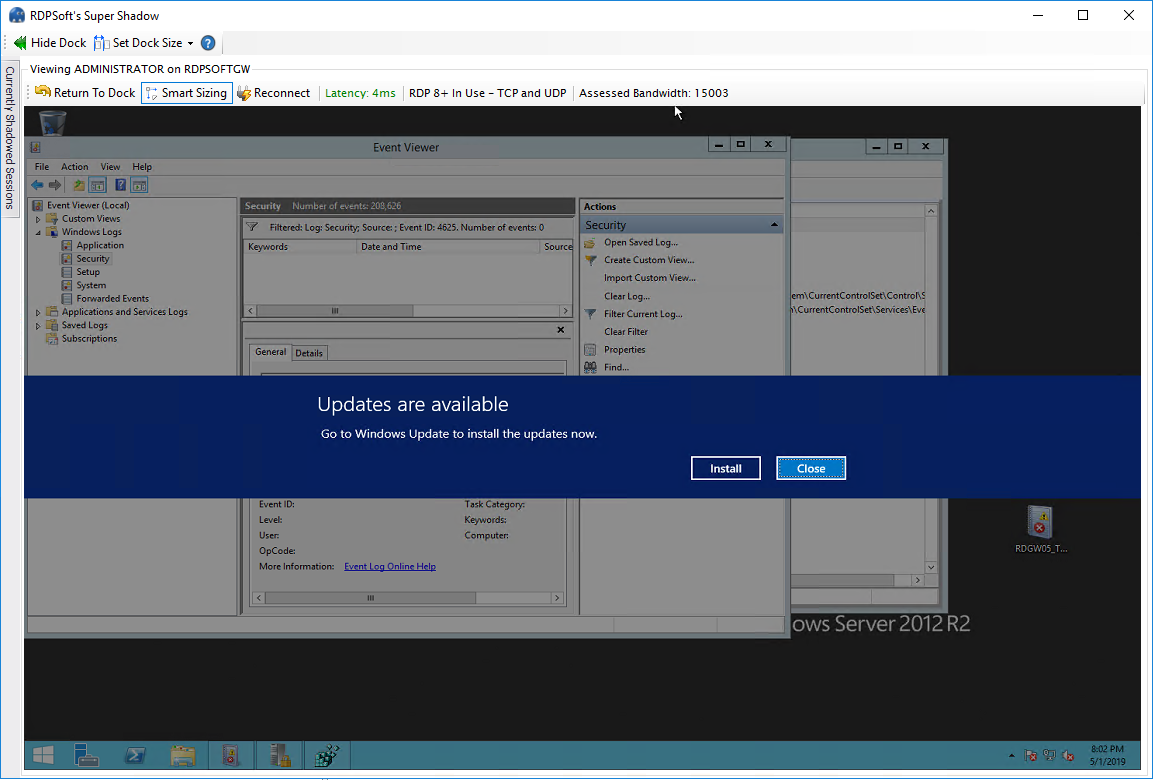
We call these new tools in the Remote Desktop Commander Client Premium Management Features.  For $99.99 per admin or help desk user per year, all of the aforementioned problems go away.  Want to shadow Server 2012+ systems from Windows 7?  No problem.  Want to monitor multiple user sessions at once in live view in one window?  We do that.  Do you have RDS users with multiple monitors that you haven’t been able to shadow before? Again, we’ve got you covered.

Watch this quick video on YouTube to see these features in action:

Next, download the latest copy of the Remote Desktop Commander Lite client.  Once you install it, you’ll be able to preview the SuperShadow features for 15 days.  The RDS Management Delegation Wizard becomes available after you purchase a subscription from us. 

Once you start your subscription, you’ll immediately be emailed a license file that will unlock all of those features.

SuperShadow


**Note 1: With the release of Premium Management Features in Remote Desktop Commander Lite, legacy shadowing support for Windows Server 2008 and legacy shadowing through the MSTSC client were retired. These features remain available in our Remote Desktop Commander Suite solution however.

**Note 2: If you are an existing Remote Desktop Commander Suite customer who would like to test these new Premium Management Features, please install the latest client on a VM or system OTHER than the system running the core Remote Desktop Commander Suite components.

Updated: November 2020.

Filed Under: Software Releases Tagged With: mstsc, multimon shadowing, multiple monitor shadowing, remote desktop shadowing, session shadowing, terminal server shadowing

  • « Previous Page
  • 1
  • …
  • 6
  • 7
  • 8
  • 9
  • 10
  • …
  • 19
  • Next Page »
  • Email
  • LinkedIn
  • Twitter
  • YouTube

Not Sure Where To Start?

In just a few moments, you can find the right fit of solutions and even services for your needs.

> Get Going Now.

Help Documents

Remote Desktop Commander
Help and Users Guide
Release Notes (ver 8.x)

Sign Up for Remote Desktop Tips and RDPSoft Updates

Blog Topic Categories

  • Azure RemoteApp
  • Azure Virtual Desktop
  • citrix edgesight
  • Citrix Edgesight Replacement
  • Citrix Shadowing
  • Cloud RDP Monitoring
  • DEX
  • Performance
  • RDP Disconnects
  • RDP Latency
  • RDP Login Time
  • RDP Login Tracking
  • RDP Logon Failure Tracking
  • RDP Logs
  • RDP Loss Rate
  • RDP Security
  • RDP Transmission Rate
  • RDS Infrastructure
  • RDS License Metering
  • RDS Licensing
  • Remote Desktop Bandwidth
  • Remote Desktop CPU
  • Remote Desktop Management
  • Remote Desktop Memory
  • Remote Desktop Memory Usage
  • Remote Desktop Monitoring
  • Remote Desktop Performance
  • Remote Desktop Protocol
  • Remote Desktop Reporting
  • Remote Desktop Security
  • Remote Desktop Services
  • Remote Desktop Services Free Tools
  • Remote Desktop Services Hotfix
  • Sensitive Data
  • Server 2012 TSAdmin Replacement
  • Shadow User
  • Software Releases
  • SPLA Reporting
  • Synthetic RDP
  • Sysmon
  • Telecommuting/Teleworking
  • Terminal Server Logging
  • Terminal Server Monitoring
  • Uncategorized
  • User Activity Monitoring
  • User Productivity
  • User Profiles
  • Windows 2008 Terminal Server
  • Windows Virtual Desktop
  • WVD Login Time
  • XenApp Monitoring
  • XenApp Reporting

Recent Posts

  • DEX Monitoring for AVD
  • Remote Desktop User Activity Monitoring
  • Remote Desktop Commander Suite v8 Now Available!
  • Remote Desktop Commander Suite v8 Beta Details, Plus a New Solution to Limit Local Admin Rights in EUC
  • Fix My Session v1 Now Available!

From the RDPSoft Blog

  • DEX Monitoring for AVD
  • Remote Desktop User Activity Monitoring
  • Remote Desktop Commander Suite v8 Now Available!
  • Remote Desktop Commander Suite v8 Beta Details, Plus a New Solution to Limit Local Admin Rights in EUC
  • Fix My Session v1 Now Available!
  • Email
  • LinkedIn
  • Twitter
  • YouTube

We Do “Single Pane of Glass” Monitoring and Management for RDS

Top Level Deployment Dashboard

One of the biggest criticisms leveled against Microsoft's Remote Desktop Services as an end user computing (EUC) platform is its complete lack of integrated management and monitoring tools. … Learn more about our centralized RDS monitoring and management >

Reach Out

For fastest response, reach out via our sales and support contact forms.

Sales
US: 1-855-738-8457 x1
Outside the US: 1-702-749-4325 x1

Support
for Evaluators and Priority Support Customers
US: 1-855-738-8457 x2
Outside the US: 1-702-749-4325 x2

© Copyright 2013–2026 RDPSoft. All Rights Reserved. RDPSoft is the sole authorized publisher and distributor of the following software titles: Remote Desktop Commander, Premium Management Features, Remote Desktop Canary · Sitemap