RDPSoft

Remote Desktop and Terminal Server Software

We Monitor, Manage & Fix RDS, AVD, Citrix and Parallels RAS
  • Products / Services
    • Not Sure Where To Start?
    • The Complete Monitoring and Management Bundle For End User Computing
    • RDS / AVD Monitoring & Reporting
      • Remote Desktop Commander Suite
      • Sysmundo
    • RDS / AVD Management and RMM Tools
      • Remote Desktop Commander Lite (Free RDS/AVD Management Tool)
      • Remote Assistance RMM Tool + Delegation of Management for RDS/AVD Support Desk
      • Automatic Resolution of Locked Profiles and Stuck Sessions
    • RDS/AVD Synthetic Login Monitoring / Connection Time / Uptime Monitoring Tools
      • Remote Desktop Canary
    • RDS/AVD/Citrix Profile and Session Problem Remediation
      • Fix My Session
    • Digital Forensics and Incident Response Tools
      • Sysmundo
    • Consulting and Professional Services
      • RDS Performance Audits, Security Audits, and General RDS Consulting
      • Custom Report Design Services
      • Training and Other Professional Services
  • Download
    • RDC Lite: Free RDS/Citrix Session and Farm Manager
    • RDC Lite With Premium Management Features
    • RDC Suite: Installer and Release Notes
    • Remote Desktop Canary – Request a Demo/Trial
    • Sysmundo
    • Request Upgrade To New Version
  • Buy
    • The Complete RDS/AVD Monitoring and Management Bundle Purchase Options
      • Start Monthly Subscription Now
      • Start Annual Subscription Now
    • Remote Desktop Commander Suite Purchase Options
      • Start Monthly Subscription Now
      • Start Annual Subscription Now
      • Buy Perpetual License(s)
    • Premium Management Features Purchase Options
      • Start Monthly Subscription Now
      • Start Annual Subscription Now
    • Remote Desktop Canary Purchase Options
      • Start Monthly Subscription Now
      • Start Annual Subscription Now
    • Fix My Session Purchase Options
      • Start Monthly Subscription Now
      • Start Annual Subscription Now
    • Sysmundo Purchase Options
      • Start Monthly Subscription Now
      • Start Annual Subscription Now
    • Buy Incident Based Support Packages
    • Pricing
  • Blog
  • Support
    • Contact Support / Submit Ticket
    • RDPSoft Knowledge Base
  • Contact
  • Partners

A Remote Desktop Log Viewer Tool . . . For Free

April 13, 2018 By admin Leave a Comment

It has been around a while, but if you’ve missed it, RDPSoft released a free Remote Desktop log viewer tool quite sometime ago called RDS Log Viewer. And since this post was first written in April of 2018, it’s been updated. So, the later versions are even better now.

For more information, you can see the details on the Remote Desktop Gateway features and get the download link.

But first, here’s a screenshot of it in action . . .

RDSLogViewer

To summarize the features very briefly, this tool displays both logon failures and successful logons from RDS session hosts. It has many features to assist you in finding the user account of an logon failure and then locating the attacker’s source IP, including:

  • Displaying traditional “security log only” RDS failures when the Security Layer is RDP
  • Correlating logon failures with NLA when the Security Layer is TLS/SSL

In addition, there are other features such as:

  • Showing all successful RDS authentifications
  • Ability to export the results to comma-delimited text
  • Ability to geolocate the attacker’s IP address

. . . And of course, there is much more now.

Read more and download the tool for free.

Updated: October 2020.

Filed Under: RDP Logs, Remote Desktop Performance, Remote Desktop Reporting, Remote Desktop Services, Remote Desktop Services Free Tools, User Activity Monitoring

Version 4 of Remote Desktop Commander Almost Ready!

December 14, 2017 By admin Leave a Comment

Hello friends and existing customers! We’re excited to let you know that the release of Remote Desktop Commander v4 is just about ready, and wanted to give you a sneak peak of all of the new features it contains.

We will be releasing Version 4 shortly after the start of the new year, along with a small price increase – our first price increase in over 18 months. If you’d like to test drive a release candidate of version 4, please complete the form here and mention that you want to try the release candidate of Version 4 in your comments.

New Remote Desktop Commander 4 Features

Now You Can Pinpoint Historic CPU, Memory, and Other Session Load Bottlenecks on Servers Instantly With the “Historical Performance and Load Across the Farm” Dashboard

Previous versions of Remote Desktop Commander allowed you to view recent performance metrics across your servers, as well as pull up snapshots of performance for all user sessions given a specific period of time. However, the new Historical Performance And Load Across The Farm Dashboard allows you to scroll through hour-by-hour graphs of when your RDS session host servers were under peak load, in terms of memory, CPU, or session count. The graph is interactive, so you can click on a point of interest, and you will immediately be transported to another dashboard that shows you all of the sessions active in that time frame, so you can review the user session(s) that contributed most to the server load and determine what they were doing at the time.

Historical Performance And Load Across the Farm
Track CPU, Memory, and Session Counts On Your RDS Servers Over Time
Historical Performance And Load Across the Farm (2)
Pinpoint Times of High Resource Utilization on RDS Session Hosts.

Historical Performance And Load Across the Farm (3)

Review Which Users Caused High Resource Utilization
After Clicking On a Timeframe of High Resource Utilization, Immediately See Which Users Impacted the Session Host(s) Most.

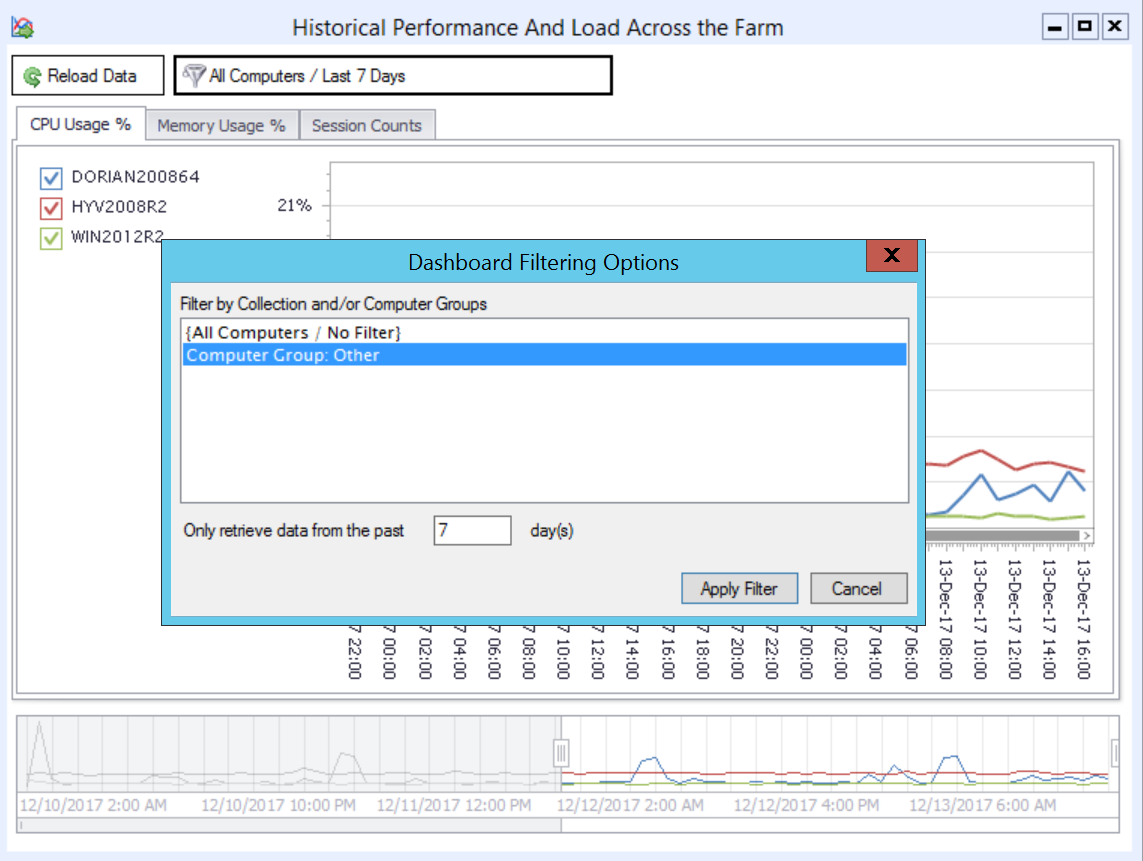
Quickly Filter Dashboards By Date Range and RDS Collection Name / Server Groups

For organizations with larger RDS deployments, attempting to review all of the session host servers in a single dashboard can get complicated. Version 4 of Remote Desktop Commander allows you to quickly filter dashboards by an 1.) RDS collection name, 2.) a user-defined group of RDS servers, and 3.) in some cases, a date range lookback. By doing so, you can keep multiple dashboards up and running inside the Remote Desktop Commander Client, with one dashboard per RDS collection.

Filter Dashboards By RDS Collections
Limit the Scope of Session Hosts Shown in Dashboards By Filtering By Collection Name or Computer Grouping.
Filtered Dashboard By Computer Group
A Dashboard With Fewer Elements Filtered By RDS Collection Name / Computer Group

Azure and Standard SQL Server Authentication Support

Previous versions of Remote Desktop Commander required use of a local SQL Server deployment with Windows Integrated Authentication. Version 4 now also allows you to use a.) an on-premise SQL server with Standard (explicit username/password) Authentication and/or b.) a Microsoft Azure SQL Server deployment. This provides organizations with the flexibility to create multiple SQL databases for multiple RDS deployments on a single SQL Server, even when each deployment is isolated in a different, non-trusting Windows domain.

Now Use Standard SQL Connections and Azure SQL Connections to Store and Review RDS Data

Other Performance Improvements

In addition to the features listed above, we’ve made many other performance improvements and bug fixes in this version. Stay tuned for our official launch announcement shortly!

Filed Under: Remote Desktop CPU, Remote Desktop Management, Remote Desktop Memory, Remote Desktop Memory Usage, Remote Desktop Performance, Remote Desktop Services, Software Releases, Terminal Server Monitoring Tagged With: RDS Collection, RDS Performance Monitoring, Remote Desktop Services

Repping RDS at Techmentor 2017

August 13, 2017 By admin Leave a Comment

Check out our CEO Andy Milford speaking at last week’s prestigious Techmentor event, at Microsoft’s renowned Redmond Campus.

RDPSoftTechmentor2017

This was Andy’s second straight appearance as an expert speaker at Techmentor – this year giving back-to-back talks on the topics of Remote Desktop Services in Window’s Server 2016, as well as alternatives to Azure Remote App.

RDS and Citrix enthusiasts also had the opportunity to break bread with Andy at the “Bird’s Of A Feather” luncheon.

RDPSoftBirdsOfAFeatherLunch

Watch our blog or follow our twitter @RDPSoft for upcoming posts with highlights from these talks!

Filed Under: Azure RemoteApp, Remote Desktop Services Tagged With: Andy Milford, Azure RemoteApp, RDS, Remote Desktop Services, Techmentor

Love Pouring In For Remote Desktop Commander!

March 9, 2017 By admin Leave a Comment

Greetings, loyal friends and RDPSoft customers. Today, we wanted to thank you all for the warm feedback we’ve been receiving lately from users of our free Remote Desktop Commander Lite Citrix/RDS Session Manager, as well as the full Remote Desktop Commander Suite. We’re hard at work on Version 4 of Remote Desktop Commander, which will be released in Q2 of 2017, which we’ll let you know about more shortly.

In the meantime, we wanted to share some of the great customer feedback we’re getting – your input and kudos continues to motivate us to make the best and affordable monitoring and management tools for Microsoft Remote Desktop Services and Citrix XenApp/XenDesktop. Enjoy!

Just wanted to drop you a note and thank you again for everything. The full version of this software is really, really good. So many metrics that we didn’t have before, and the console is much better to monitor sessions from than Citrix Studio (or Director) in my opinion.

Love this software. Brilliant!!! Exposure is all that is needed. Great Stuff, life savior in the world of offshore software development.

Great news!!! RDPSoft is operating well with an excess of 110 users on all servers.

Great software and stats, was a huge help.

If you’d like to see what the buzz is about firsthand, feel free to download and use our completely free Remote Desktop Commander Lite tool for all of your RDS/Citrix active session management needs. Or, start a monthly subscription of the Remote Desktop Commander Suite software for only $9 per server per month, and start gaining insight to your entire farm with dashboards and over 80 pre-built reports.

Filed Under: Remote Desktop Services, Remote Desktop Services Free Tools

Remote Desktop Services Logon Failures

January 24, 2017 By admin Leave a Comment

Have you ever found yourself trying to hunt down the source of logon failures in your Remote Desktop Services farm? It’s trickier than you may have realized.

Our very own Andy Milford, Microsoft MVP in Enterprise Mobility / Remote Desktop Services, just wrote a lengthy article on the topic you can read at his RDS MVP outreach site – http://www.purerds.org.

In the article, he talks about how Group Policy authentication settings like Network Level Authentication and the RDP security layer directly affect how Remote Desktop Services logon failures are recorded in the Security log (Event ID 4625). He also shares tips regarding additional events you can use in a little known event log to correlate where logon failures are actually coming from if the Remote Desktop Session Host is running Windows Server 2012 or Windows Server 2016.

We look forward to building some of this hard won knowledge into our Remote Desktop Commander product line soon. In the meantime, please enjoy some of Andy’s detailed research on the subject.

Filed Under: Remote Desktop Services

  • 1
  • 2
  • 3
  • Next Page »
  • Email
  • Google+
  • LinkedIn
  • Twitter
  • YouTube

Not Sure Where To Start?

In just a few moments, you can find the right fit of solutions and even services for your needs.

> Get Going Now.

Help Documents

Remote Desktop Commander
Help and Users Guide
Release Notes (ver 6.x)

Sign Up for Remote Desktop Tips and RDPSoft Updates

Blog Topic Categories

  • Azure RemoteApp
  • Azure Virtual Desktop
  • citrix edgesight
  • Citrix Edgesight Replacement
  • Citrix Shadowing
  • Cloud RDP Monitoring
  • DEX
  • Performance
  • RDP Disconnects
  • RDP Latency
  • RDP Login Time
  • RDP Login Tracking
  • RDP Logon Failure Tracking
  • RDP Logs
  • RDP Loss Rate
  • RDP Security
  • RDP Transmission Rate
  • RDS Infrastructure
  • RDS License Metering
  • RDS Licensing
  • Remote Desktop Bandwidth
  • Remote Desktop CPU
  • Remote Desktop Management
  • Remote Desktop Memory
  • Remote Desktop Memory Usage
  • Remote Desktop Monitoring
  • Remote Desktop Performance
  • Remote Desktop Protocol
  • Remote Desktop Reporting
  • Remote Desktop Security
  • Remote Desktop Services
  • Remote Desktop Services Free Tools
  • Remote Desktop Services Hotfix
  • Sensitive Data
  • Server 2012 TSAdmin Replacement
  • Shadow User
  • Software Releases
  • SPLA Reporting
  • Synthetic RDP
  • Sysmon
  • Telecommuting/Teleworking
  • Terminal Server Logging
  • Terminal Server Monitoring
  • Uncategorized
  • User Activity Monitoring
  • User Productivity
  • User Profiles
  • Windows 2008 Terminal Server
  • Windows Virtual Desktop
  • WVD Login Time
  • XenApp Monitoring
  • XenApp Reporting

Recent Posts

  • Fix My Session v1 Now Available!
  • How To Perform User Activity Monitoring in Azure Virtual Desktop
  • Remote Desktop Commander v7 Now Available!
  • How To Deploy Sysmon The Easy Way
  • Remote Desktop Canary v4.0 Now Available!

From the RDPSoft Blog

  • Fix My Session v1 Now Available!
  • How To Perform User Activity Monitoring in Azure Virtual Desktop
  • Remote Desktop Commander v7 Now Available!
  • How To Deploy Sysmon The Easy Way
  • Remote Desktop Canary v4.0 Now Available!
  • Email
  • Google+
  • LinkedIn
  • Twitter
  • YouTube

We Do “Single Pane of Glass” Monitoring and Management for RDS

Top Level Deployment Dashboard

One of the biggest criticisms leveled against Microsoft's Remote Desktop Services as an end user computing (EUC) platform is its complete lack of integrated management and monitoring tools. … Learn more about our centralized RDS monitoring and management >

Reach Out

For fastest response, reach out via our sales and support contact forms.

Sales
US: 1-855-738-8457 x1
Outside the US: 1-702-749-4325 x1

Support
for Evaluators and Priority Support Customers
US: 1-855-738-8457 x2
Outside the US: 1-702-749-4325 x2

© Copyright 2013–2026 RDPSoft. All Rights Reserved. RDPSoft is the sole authorized publisher and distributor of the following software titles: Remote Desktop Commander, Premium Management Features, Remote Desktop Canary · Sitemap