
RemoteApps Only Display a Black Screen or Artifacts When Shadowed With Remote Desktop Commander’s SuperShadow Feature
When attempting to use the SuperShadow feature of the Remote Desktop Commander Client – which is part of the Premium Management Features product – to shadow RemoteApp sessions on RDS and AVD hosts, the screen may stay black, only display part of the RemoteApp, or only display blinking artifacts.
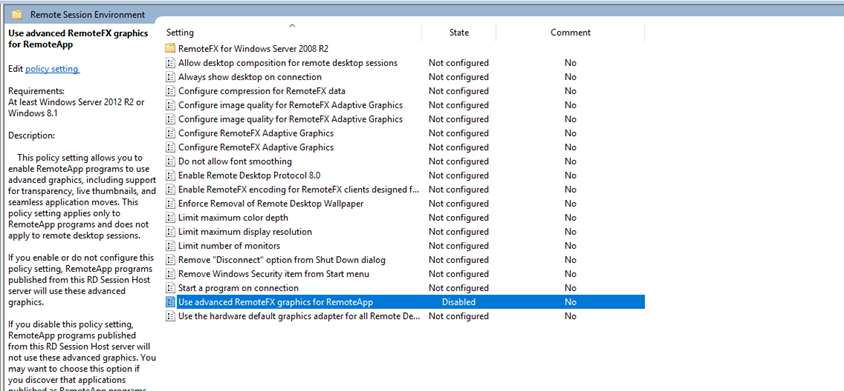
To resolve this issue, you may need to disable the following Group Policy setting on all of your AVD and RDS hosts which are serving RemoteApp sessions.
GPO Location: Local Computer Policy->Computer Configuration->Administrative Templates->Windows Components->Remote Desktop Services->Remote Desktop Session Host->Remote Session Environment
GPO Setting: Use advanced RemoteFX graphics for RemoteApp – Set to Disabled
Once this setting has been disabled, restart your session hosts at the next possible maintenance interval, and then re-try shadowing those RemoteApp sessions with SuperShadow. You should then be able to see the shadowed RemoteApp in its entirety.
