The Remote Desktop Canary Version 3 release represented a point of major overhaul in its evolution. Why? Here are a few of the key capabilities that came along and continue to make it such a powerful synthetic monitoring tool.
Remote Desktop Canary v2.3 Highlights
The release of Version 2.3 of Remote Desktop Canary, our synthetic RDP and WVD monitoring and alerting workhorse, offered a whole batch of powerful new features and improvements:
- WVD support. Whether you’re still using WVD classic (e.g. Fall 2019 Mode), or you’ve migrated over to WVD in ARM mode (e.g. the Spring 2020 Update), Remote Desktop Canary now supports WVD.
- An enhanced workflow cloning wizard. Now, if you want to test each of your session hosts or WVD hosts “all the way to the desktop” using OCR event detection, our new wizard duplicates your test settings across all of your hosts in one easy step.
- We’ve improved our OCR alerting engine, so if specific text you are screening for is not seen within a certain number of seconds, Canary’s email alert will include all of the screenshots during the login sequence. As a result, you will immediately see if the login attempt has stalled while loading user profiles/FSLogix, encountered a black screen, or encountered another issue.
Remote Desktop Commander v4.9 Highlights
Version 4.9+ of the Remote Desktop Commander Suite and Premium Management Features overlay offers:
- brand new reports that track things like RDP loss and retransmission rates, hourly load on servers, user reconnection attempts through a Remote Desktop Gateway, and much more
- an overhaul of our existing reporting, with a focus on better chart presentation and automatic chart data aggregation in larger environments
- the ability to delegate out management tasks and shadowing to Citrix help desk staff members, allowing them a much more streamlined shadowing experience that does not require the use of Citrix Director or Microsoft Remote Assistance
- numerous other product enhancements
5 Key Synthetic Login Monitoring Features Available In Remote Desktop Canary v2.0+
We get so much great feedback from our customers, and as any software solution matures, it’s easy to lose track of the details of features and the reasons customers need them.
In the case of our Remote Desktop Canary, some key features in v2.0+ have made it the synthetic login monitoring workhorse that it is.
User Session Shadowing in Remote Desktop Commander v4.7+
Until the release of our Remote Desktop Commander v4.7, one of the continuous laments that we used to hear from our customer base for years centered on the user session shadowing in Remote Desktop Services. This is a shame, because the internal architecture for shadowing from Windows Server 2012 R2 onwards is pretty amazing! Using MSTSC to shadow proved however less than smooth. The litany of complaints has always included problems like:
- lack of proper shadowing support (zoom out) for multiple monitor sessions;
- dreaded permissions errors;
- the unfortunate requirement for help desk users to be administrators (!) on the terminal servers they want to shadow;
- the inability for Windows 7 systems to initiate shadowing on Server 2012/2016/2019 systems and Windows 8 and 10 workstations.
There was also the small issue that there were no tools for shadowing/remote assistance inside Windows Virtual Desktop in Azure.
By the way: Check out this twisted history of shadowing RDP users.
In the resulting confusion, admins and IT staff have been paying an arm and a leg for remote assistance tools to bridge this gap for years. These tools require heavy install footprints, hundreds or even thousands of dollars per technician per year, and tedious invitation URLs, etc. are required to start helping users.
Which Reminds Us: Delegation of Administration Options for Remote Desktop Services Has Been Nonexistent For W a y T o o L o n g
The other need that we heard frequently from our customers: To have the ability to precisely delegate Remote Desktop Services management permissions to their help desk and front line support staff. For a while, the only real option had been to give help desk staff admin rights on session hosts and connection brokers. Not an ideal situation from a security, or a “whoops I just rebooted a terminal server with 30 user sessions running line of business apps” perspective.
We tried to resolve some of these issues with our RDSConfig utility, that allowed permissions reassignment for users and groups on session hosts. However, in larger RDS collections, you need a way to apply those permissions to a huge swath of session hosts all at once – especially as new session hosts are brought online. Also, to do their jobs, help desk staff need rights to query the Connection Broker to dynamically list RDS collections and the servers that are members of each, plus they should have the ability to read RDS-related performance counters on those session hosts, so they can troubleshoot things like network latency from the client to the server.
So, We Figured Out How To Make User Session Shadowing Much Better AND Created a Wizard To Let You Delegate RDS Management Tasks To Your Help Desk Staff

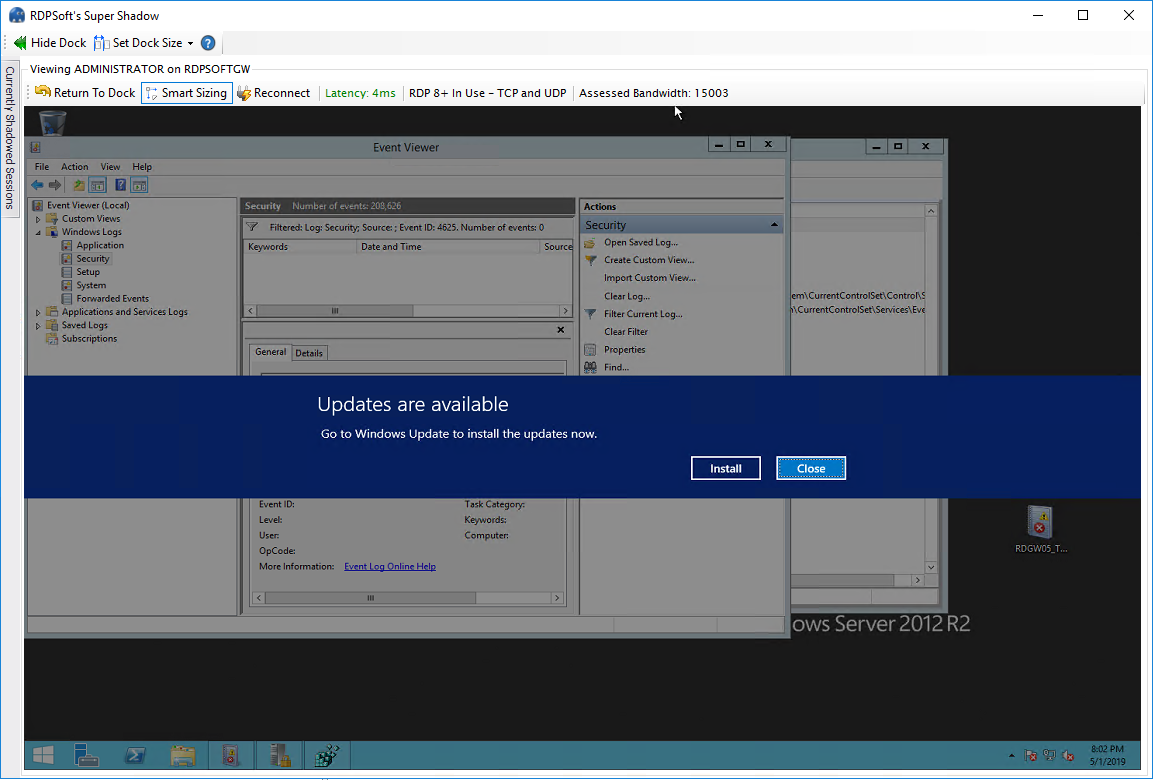

We call these tools in the Remote Desktop Commander Client Premium Management Features. Want to shadow Server 2012+ systems from Windows 7? No problem. Want to monitor multiple user sessions at once in live view in one window? We do that. Do you have RDS users with multiple monitors that you haven’t been able to shadow before? Again, we’ve got you covered.
Where To Go Next To Find Out More . . .
Request a web demo with an RDPSoft solutions expert to see all our solutions’ features in depth.
Updated: November 2020.
